Blog· 7 min read
Pick the right model for every coding agent, without guessing
Stoic Browser 0.3.0 reads the models your account can use from each coding CLI, keeps a model and effort per agent, and flags a retired model before your next turn fails.
You open a chat, pick Cursor Agent, and type a model name you half remember from a changelog. The turn runs for a few seconds and comes back empty. Was the name wrong? Is the model only on a higher plan? Did the CLI fall back to something else without saying so? You open a terminal, run the CLI's own model command, copy an id, paste it back, and try again.
Switch to Codex for a second opinion and it gets worse. The model you set a minute ago was meant for Cursor, and Codex has never heard of it. Using more than one coding agent meant keeping a mental list of which model ids belong to which CLI, and which of those your account can actually run.
What changed
Stoic Browser 0.3.0 asks each coding CLI which models your account can use, and shows that list in the agent picker. Now you can pick a model by name from what the CLI really offers, set how hard it should think, and switch agents without one CLI's model leaking into another.
When something still goes wrong, the chat tells you what failed instead of handing you an empty reply.
How it works in practice
The picker shows what your account can run
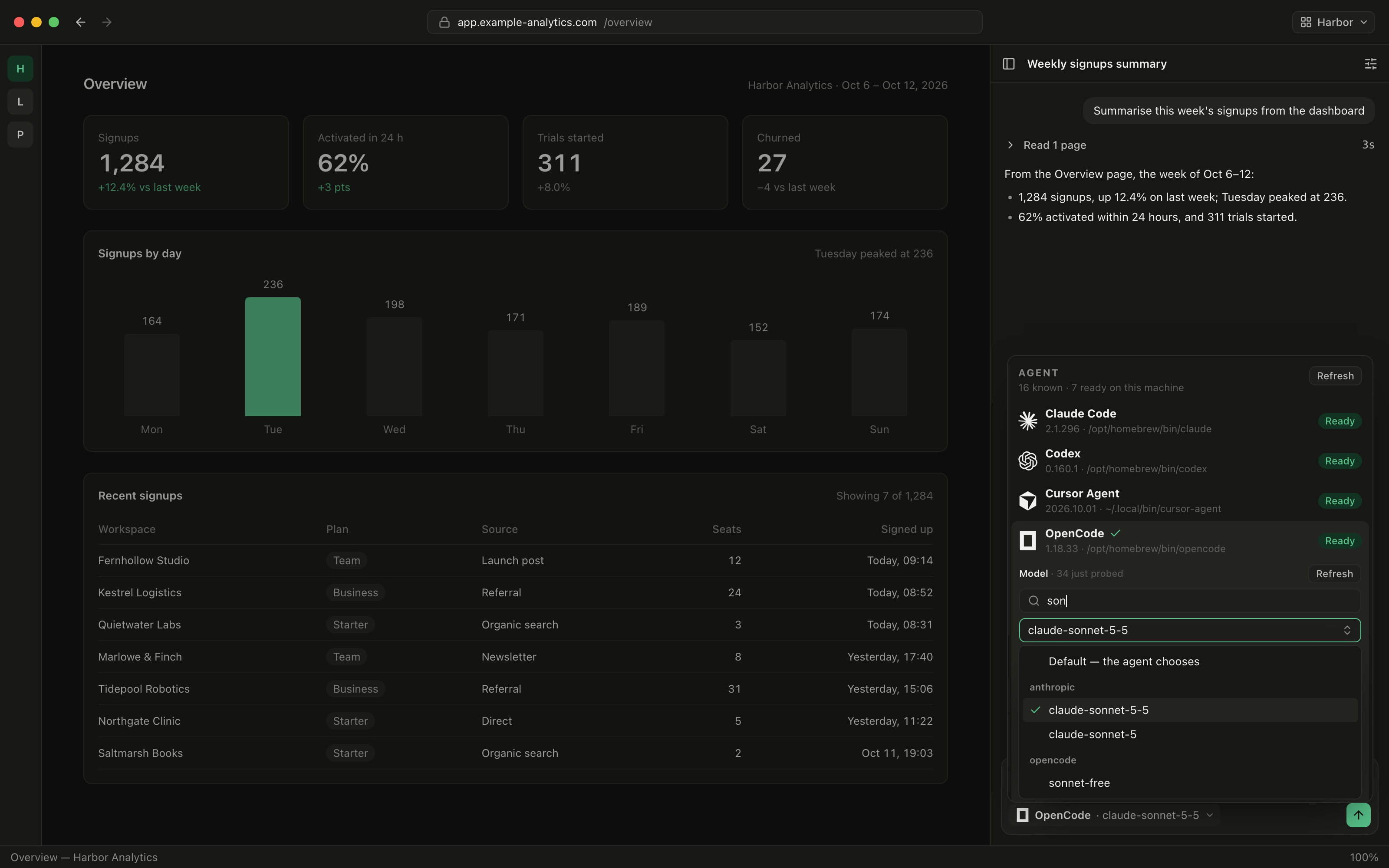
Open the agent picker at the bottom of the chat rail and choose an agent. Under it, the Model field now lists the models that CLI reports for your signed-in account. This used to work only for Codex and OpenCode. It now also covers Cursor Agent, Antigravity, Grok Build, Pi, Oh My Pi, Kiro CLI, Devin, Kimi Code and Qwen Code.
Next to the Model label, the picker says where the list came from: "just probed" when it asked the CLI moments ago, "from the CLI, cached" when it is reusing a list read earlier, or "built-in aliases" when the CLI cannot report one. Lists are kept for a day, so the picker opens instantly. Press Refresh beside the label when you have just upgraded a plan or installed a new provider, and the CLI is asked again.
If a CLI cannot list its models, the picker shows why with "Could not read the model list:" and the CLI's own reason. That way you know it is a login or install problem before you send a message. Hermes Agent has no list command at all, so its picker takes a typed provider/model id and shows an example of the format.
The first entry is always "Default — the agent chooses". Leave it there and the CLI uses whatever its own configuration says.
Long lists are easy to search
OpenCode, Pi and Kimi Code can report dozens of models across several providers. Once a list passes twenty entries, a "Filter N models" box appears above it. Type "son" and you see only the Sonnet variants. Catalogs written as provider/model are grouped under each provider's name, so anthropic models sit together and OpenCode's own free models sit under opencode.
Effort follows the model
Many CLIs now let you trade speed for depth, but the levels differ by CLI and sometimes by model. The picker shows an Effort setting wherever the CLI accepts one: Claude Code, OpenCode, Grok Build, Pi, Oh My Pi, Kiro CLI, Hermes Agent and Aider.
Codex goes a step further and offers each model's own reasoning levels, with that model's default named beside the label. Change the model to one that does not support the level you had selected, and Stoic Browser drops back to the new model's default. You no longer start a turn with a flag the CLI will reject.
Each agent keeps its own model
Pick a model and effort for Codex, switch to Claude Code to compare, then switch back. Codex still has the model you gave it, and Claude Code never received Codex's model id. Each agent keeps its own model and effort, so moving between CLIs no longer breaks the next turn.
Claude Code's list also gains Fable, alongside Opus, Sonnet and Haiku.
A model that disappeared is flagged before it fails
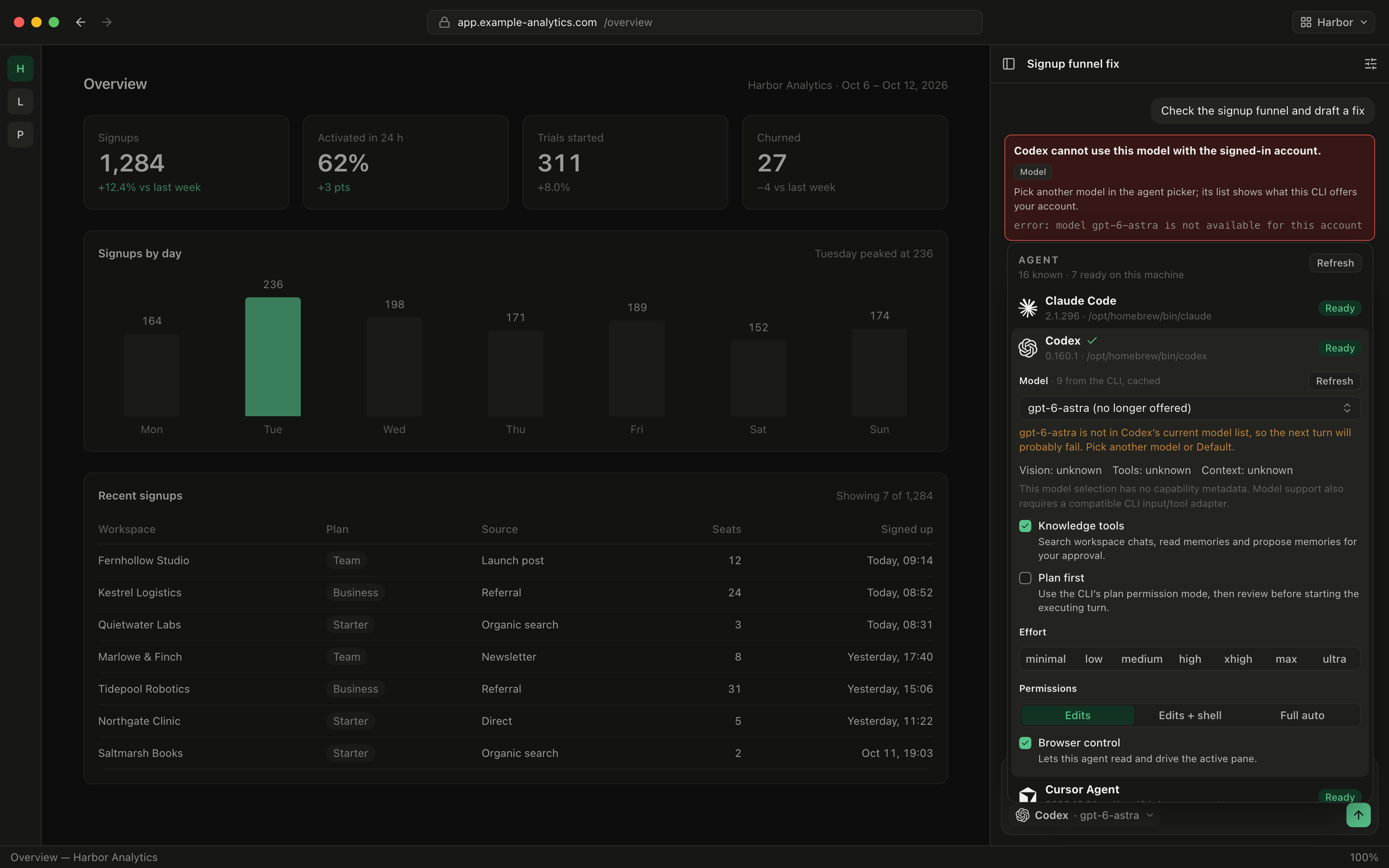
Providers retire and rename models. Before 0.3.0, a saved model the CLI stopped offering stayed selected, and you only found out when a turn failed. Now the picker keeps it visible but labels it "(no longer offered)", with a warning underneath. The warning says the model is not in that CLI's current list, so the next turn will probably fail, and asks you to pick another model or Default.
Failures read like failures
When a turn does fail, you get a card that names the cause instead of an empty answer. A model your account cannot use shows "Agent cannot use this model with the signed-in account." with a Model badge and the CLI's raw error underneath. If you never picked a model, the card says the CLI's own default model is the one your account cannot use, which is the case people most often miss.
The same goes for expired logins, wrong API keys and usage limits, and for the errors Qwen Code and Hermes Agent used to print as if they were replies. When OpenCode keeps retrying a failing model, a status line says so, so a long wait no longer looks like a frozen run. Each failure is reported once, not twice.
Fewer runs that stall, and browser tools where they work
0.3.0 also fixes runs that failed or stalled for resumed Codex chats, Grok Build, Pi, Oh My Pi, Devin, Cline, Qwen Code, and Kimi Code under Full auto. Antigravity now works in the chat's folder.
Browser tools now go to the agents that can actually receive them. Kiro CLI runs under every permission preset and can use the browser tools. Codex and Cursor Agent no longer refuse browser tool calls in chat. Antigravity and Kimi Code no longer offer browser tools, since they could not receive them. Each agent also shows its own logo in the picker, and when Pi, Oh My Pi or Hermes Agent is not installed, the picker shows the command to install it.
Before vs After
| Task | Before 0.3.0 | With 0.3.0 |
|---|---|---|
| Find a model id | Run the CLI's model command in a terminal, copy the id | Pick it from the list the CLI reports for your account |
| Know if the list is current | Guess | "just probed" or "from the CLI, cached", plus Refresh |
| Set reasoning depth | Look up each CLI's flag | Effort setting with the levels that model supports |
| Switch from Codex to Claude Code | Re-enter the model, or send Codex's id to Claude | Each agent keeps its own model and effort |
| Use a retired model | Turn fails with an empty answer | Flagged "(no longer offered)" before you send |
| Hit a login or plan limit | Empty reply, or an error shown as text | An error card that names the cause |
Who benefits most
People who use more than one coding CLI. If you ask Codex for a draft and Claude Code for a review, each one now keeps its own model and effort, so the comparison is between two agents rather than two misconfigured runs.
People on several plans or providers. When an OpenCode or Pi setup reaches models through more than one provider, the grouped, filterable list shows exactly what each key unlocks.
Anyone who has stared at an empty reply. Expired logins, wrong keys, usage limits and unavailable models now explain themselves in the chat, so you fix the cause instead of retrying the prompt.
Try it
Update Stoic Browser to 0.3.0 from Settings → Software updates, or download it for macOS, Windows or Linux. Open the agent picker in any chat, choose the CLI you already pay for, and pick a model from the list it reports. You spend your time on the prompt instead of on model ids.