Free
1 MCP connection that holds a credential. Revoked connections do not count.
FeaturesMCP access
From outside the window
MCP access turns Stoic Browser into an MCP server. Each connection gets a preset, the workspaces it may use and a credential you can revoke. The client drives a hidden pane in that workspace, already signed in, and never sees a password.
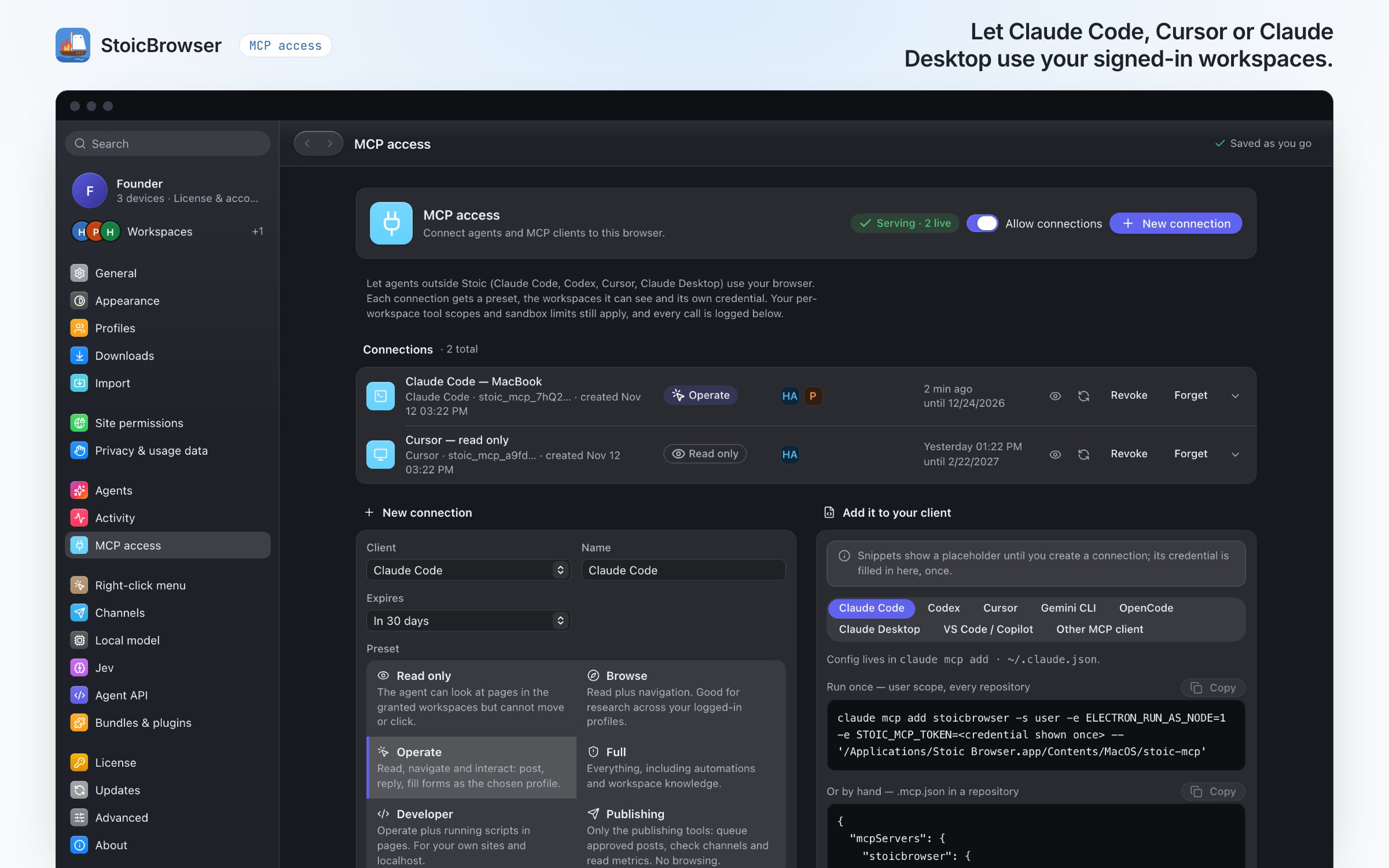
Read only, Browse, Operate, Full, Developer and Publishing. Read only can look at pages but not move or click. Full adds automations and workspace knowledge. Developer, new in 1.5.0, is Operate plus running scripts in pages, for your own sites and localhost. Publishing, a Beta since 1.6.0, holds only the tools that queue posts you approved in 1MarketingTool.
Grant selected workspaces, or all existing ones, and optionally the ones you create later. Nothing is granted by omission.
A credential expires in 7, 30 or 90 days, or never if you choose to revoke it yourself. Rotate it, and the old one stops working.
Copy-ready setup for Claude Code, Codex, Cursor, Gemini CLI, OpenCode, Claude Desktop, VS Code / Copilot or any other MCP client.
Since 1.3.0 an agent can attach files or public image and video URLs, drop files on a post composer and wait until an upload finishes.
Every call, denial and change is listed per connection, each result labelled OK, Blocked, Failed or Running, and kept for 30 days or 10,000 rows.
If the app is not running, the client starts it in the background with no window, and it quits again after 15 idle minutes. Open its window and, since 1.8.0, it is your normal browser again.
Always: server_info, browser_list_workspaces, browser_select_workspaceRead: browser_get_state, browser_extract, browser_screenshot, browser_console_logs, browser_upload_status, browser_list_tabs, browser_inspectNavigate: browser_goto, browser_go_back, browser_go_forward, browser_wait, browser_scroll, browser_hoverInteract: browser_click_ref, browser_click, browser_type, browser_fill_form, browser_press_key, browser_select_option, browser_drag, browser_upload_file, browser_drop_files, browser_solve_captcha, browser_download, browser_add_css, browser_remove_css, login_handoffRun scripts: browser_evaluateAutomations: automation_list, automation_run, automation_saveKnowledge: chat_search, memory_list, knowledge_searchPublishing: channel_connect, channel_list, channel_status, publish_job_start, publish_job_get, publish_job_replace, publish_job_cancel, publish_recipes_list, publish_recipe_selftest, metrics_read, recipe_selftest, job_get, job_cancel, suite_settings_set1 MCP connection that holds a credential. Revoked connections do not count.
Unlimited MCP connections.
Works on macOS 14 or later. Claude Desktop's config lives in ~/Library/Application Support/Claude.
Works on Windows 10 and 11, with the same clients and presets.
Something missing? Write to hello@stoicsoft.com.
No. It drives a hidden pane in a workspace that is already signed in. When a site asks for a password, the login_handoff tool pauses and asks you to sign in yourself.
Settings → MCP access has setup for Claude Code, Codex, Cursor, Gemini CLI, OpenCode, Claude Desktop and VS Code / Copilot, and a generic config for any other MCP client.
Yes. Pick a preset, choose the workspaces, and switch single tools off. The workspace's tool scopes, allowed domains and download and submit guards still apply too.
The next call starts it again in the background, with a tray icon and no window. It quits after 15 minutes without a call, or when you turn access off.
Free for 2 workspaces. No account needed. macOS and Windows.
Download Stoic Browser