Claude Code reaches a browser through an MCP server. The most common is Microsoft's Playwright MCP, added with one command, which runs a browser of its own. To act in sites you are already signed in to, Claude needs a browser that shares those sessions, through an extension or a browser that offers them over MCP.
Your options
Playwright MCP
Microsoft's open-source MCP server drives a browser through Playwright. It uses a profile of its own, so you sign in to sites there or work on public pages.
Best when Testing your own site, reading public pages, or any job that doesn't need your real accounts.
An extension in your everyday browser
Anthropic's Claude in Chrome extension lets Claude act in the Chrome tabs you are signed in to. Anthropic's documentation covers how it connects to Claude Code and which plans include it.
Best when You want Claude in the browser you already use.
Chrome with remote debugging
Starting Chrome with a debugging port lets tools attach to it. Recent Chrome versions refuse this for your default profile, so it runs a separate, signed-out one.
Best when You're building your own tooling and want low-level control.
A browser that is an MCP server
Some browsers offer their signed-in workspaces over MCP, with a credential per client. Stoic Browser is one.
Best when The agent must act in real accounts, and you want to choose which ones.
With Playwright MCP
Playwright MCP needs Node.js. Its README lists further options, such as running headless.
Add the server. In a terminal, register Playwright MCP with Claude Code:
claude mcp add playwright npx @playwright/mcp@latest
Check it is connected. List Claude Code's MCP servers and look for playwright, or type /mcp inside Claude Code.
claude mcp list
Ask for a browser task. Ask Claude Code to open a page and tell you what it finds. A browser window opens and Claude drives it with tools such as browser_navigate and browser_snapshot.
Sign in where you need to. That browser starts signed out of your accounts. Sign in to the sites the task needs in its window yourself before you hand the task over.
The same job in Stoic Browser
Stoic Browser gives Claude Code its workspaces two ways: in the browser's own agent chat, where Claude Code gets browser tools for the run, and from your terminal through MCP access, where it drives a hidden pane in the workspaces you choose, already signed in.
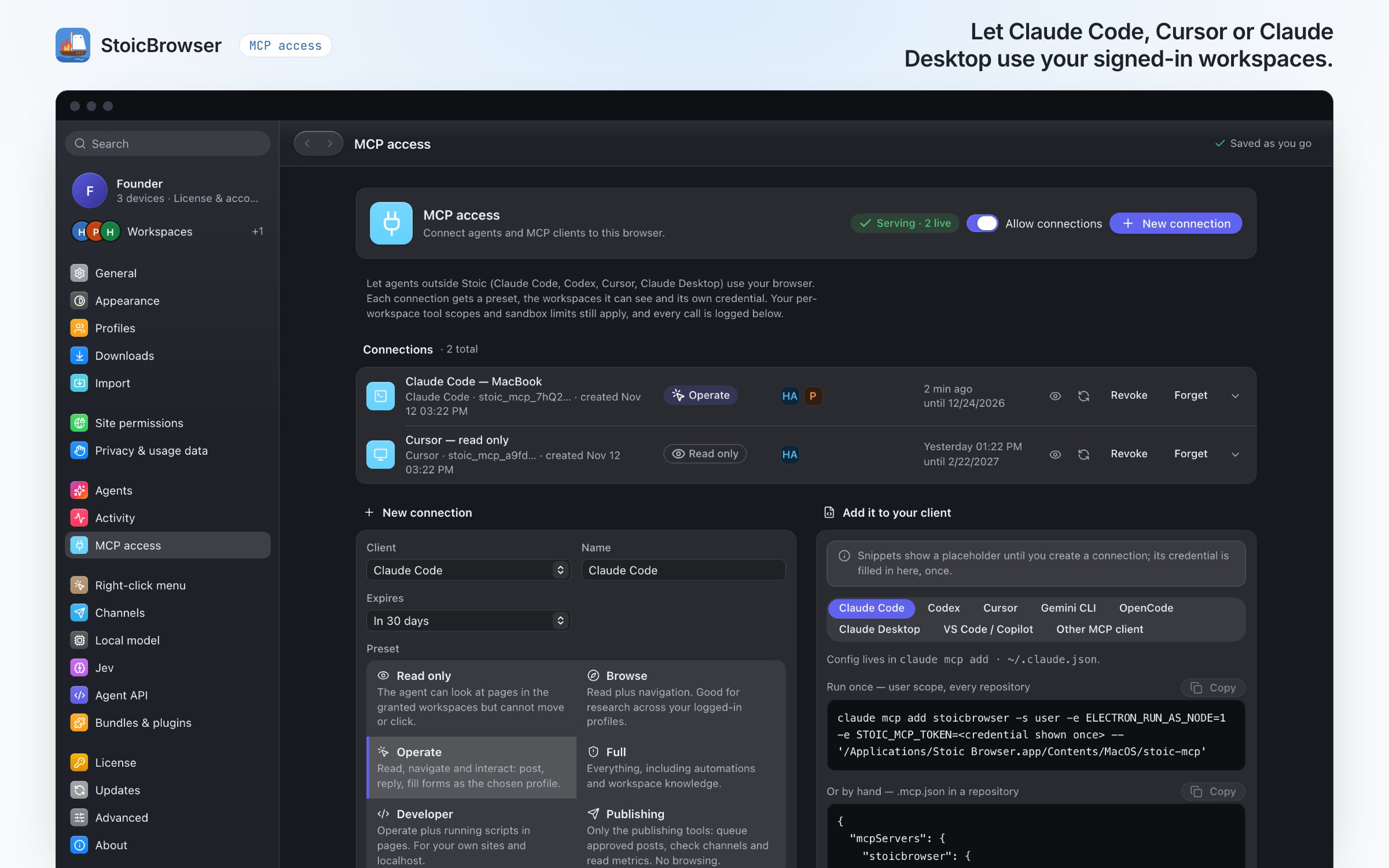
Settings → MCP access → Connect an agent gives you the setup to paste: a claude mcp add line for user scope, or a .mcp.json entry. Codex, Cursor, Gemini CLI, OpenCode, Claude Desktop and VS Code get their own snippets.
Pick a preset (Read only, Browse, Operate or Full), the workspaces it may use, and when the credential expires: 7, 30 or 90 days, or never.
If Stoic Browser is closed, the client starts it in the background.
Every call, denial and change goes into an activity log, and a sign-in page is handed to you, never to Claude.
Where: Settings → MCP access
Free includes 1 MCP connection; Pro, from $29 once, has no limit.
Settings → MCP access in Stoic Browser 1.8.0, the real components with sample data.
Not in Stoic Browser. The workspace is already signed in, and if a page asks for a password mid-run, the run pauses and you sign in yourself. What Claude Code holds is a Stoic Browser credential you can revoke, not a site password.
Can Codex or Cursor use it the same way?
Yes. MCP access writes the setup for Codex, Cursor, Gemini CLI, OpenCode, Claude Desktop and VS Code as well, and any other MCP client can use the generic config.
Why can't Claude sign in to Google in the Playwright browser?
Google refuses sign-in in browsers that automation tools control. Use the service's API where it has one, or a browser where you sign in normally and the agent works in that session.
Is MCP access free in Stoic Browser?
One connection is free. Pro, $29 once for one device, allows as many as you need, each with its own preset, workspaces and expiry.
Free for 2 workspaces. No account needed. macOS and Windows.