Free
Included on Free.
FeaturesAgent permissions and guardrails
Agents in the browser
Agent permissions decide what agents may do in a workspace: a Read only, Browse or Full preset, the sites they may act on, whether forms can be sent and files downloaded, and which tools each persona sees. Every change is logged and can be undone, and a sign-in is always handed to you.
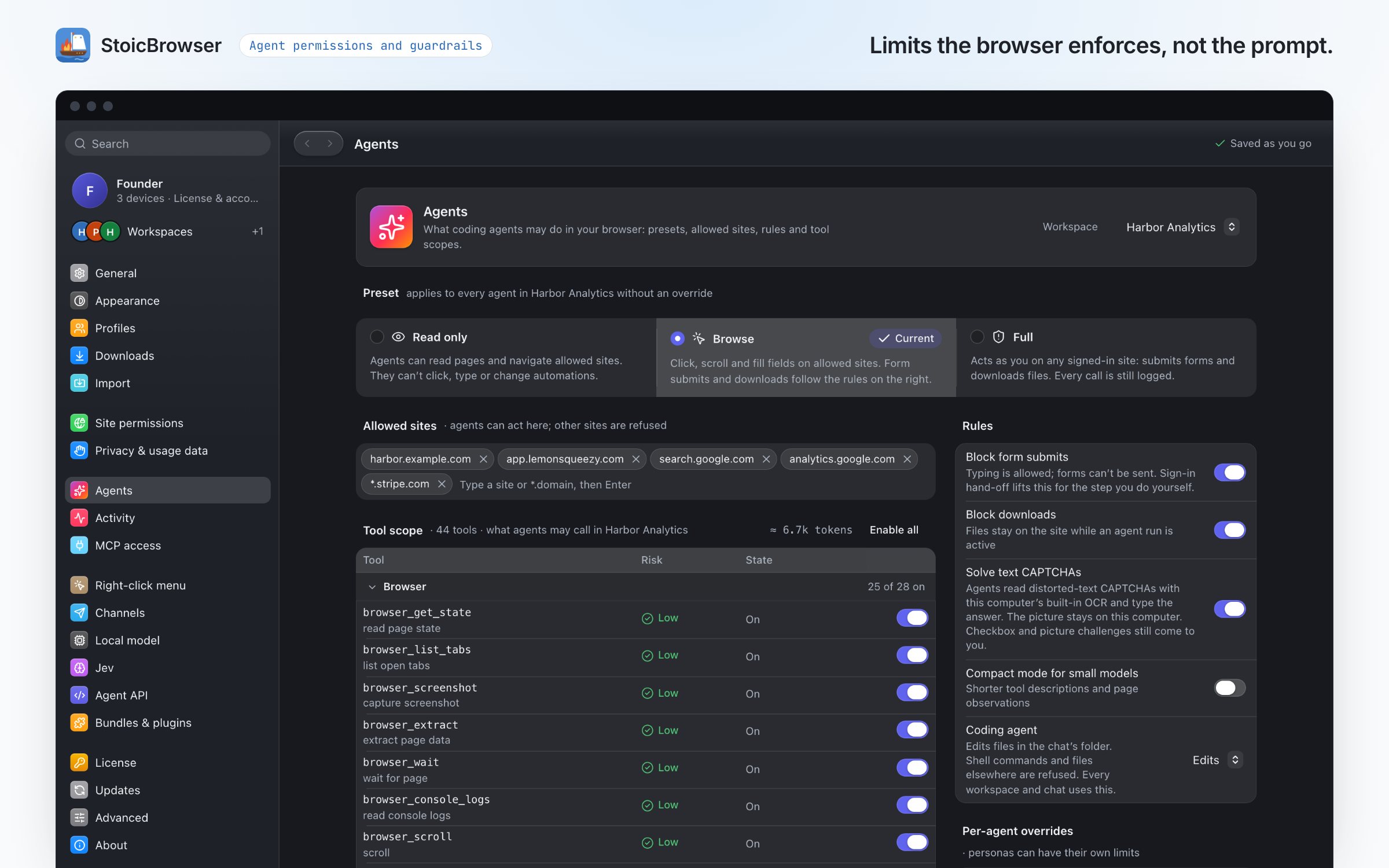
Read only reads and navigates. Browse clicks, scrolls and fills fields on allowed sites. Full acts as you, and every call is still logged.
List hosts or *.domain patterns the agent may act on; other sites are refused. An empty list allows every site.
Both are blocked by default in Read only and Browse. Typing works; sending the form doesn't.
Turn each tool on or off for the workspace or for one persona. Tools are grouped by kind with a risk level each, and Tool usage shows the calls, failures and tokens of every tool over 30 days.
Solve text CAPTCHAs, new in 1.8.0 and off by default, lets agents read a distorted-text CAPTCHA with the text recognition built into macOS or Windows and type the answer. The picture stays on your computer. Checkbox and picture challenges still come to you.
Changes agents make to settings, automations and memory are listed, and Undo restores the original value.
When a site asks for a password, the run pauses and hands the sign-in to you. The agent never sees it.
BrowserAutomationKnowledgeMemoryResearchMediaIncluded on Free.
The same on Pro.
The same limits apply to coding agents, local models and MCP connections.
Works the same as on a Mac.
Something missing? Write to hello@stoicsoft.com.
Yes. Block form submits is on by default in the Read only and Browse presets. The agent can type into fields, but the form can't be sent.
Yes. Add hosts or *.domain patterns under Allowed sites. Other sites are refused. The Full preset ignores the list.
No. When a site asks for a sign-in, the run pauses and you sign in yourself. The agent continues once you're done.
Only a text one, and only after you turn on Solve text CAPTCHAs in Settings → Agents. The agent reads it with your computer's own text recognition and types the answer. Checkbox and picture challenges are handed to you.
Changes to settings, automations and memory are listed in the Change log, and Undo restores the original value. Actions on websites are logged in Settings → Activity.
Free for 2 workspaces. No account needed. macOS and Windows.
Download Stoic Browser