How do I use a different proxy or VPN for each browser profile?
Updated 23 Nov 2026
The short answer
A VPN app usually sends all of your computer's traffic one way. To give one browser profile its own route, point that profile at a proxy instead: many VPN providers offer SOCKS5 or HTTP proxy addresses. Firefox has a proxy setting of its own, and Chrome can start a separate profile with a proxy from the command line.
Your options
A VPN for the whole computer
The VPN app routes every app and every browser profile through the same location.
Best when Everything should come from one place, and you don't need identities to differ.
Split tunneling in the VPN app
Some VPN apps can send only chosen apps through the tunnel. That works per app, not per browser profile.
Best when One whole browser should use the VPN and the rest of the computer shouldn't.
Firefox's own proxy setting
Firefox can use a proxy separate from the system's, for the whole Firefox profile. With Mozilla VPN, the Multi-Account Containers add-on can also send one container through a chosen VPN location.
Best when One Firefox profile, or one container, per identity is enough.
A Chrome profile started with a proxy flag
Chrome takes a proxy on the command line when it starts with its own data folder. It works, but you need a launch command per identity.
Best when You're comfortable with a small script for each identity.
A browser with a proxy per profile
Browsers built for several identities, Stoic Browser among them, set a proxy per profile in their settings.
Best when You switch identities many times a day.
With Firefox or Chrome
First get the proxy details from your VPN provider or proxy service: the type (SOCKS5 or HTTP), the host and the port.
Firefox: open Network Settings. In Firefox, open Settings, scroll to Network Settings at the bottom of the General page and click Settings.
Firefox: enter the proxy. Choose Manual proxy configuration, fill in the SOCKS host and port, or the HTTP proxy, and click OK. The setting covers the whole Firefox profile, so use one profile per identity.
Chrome: start a profile with its own proxy. Chrome follows the system's proxy unless you start it with a proxy flag and a separate data folder. On a Mac, from Terminal:
open -na "Google Chrome" --args --user-data-dir="$HOME/chrome-client-a" --proxy-server="socks5://10.0.0.2:1080"
Check the route. Open a what-is-my-IP page in that profile and in another one. The addresses should differ.
The same job in Stoic Browser
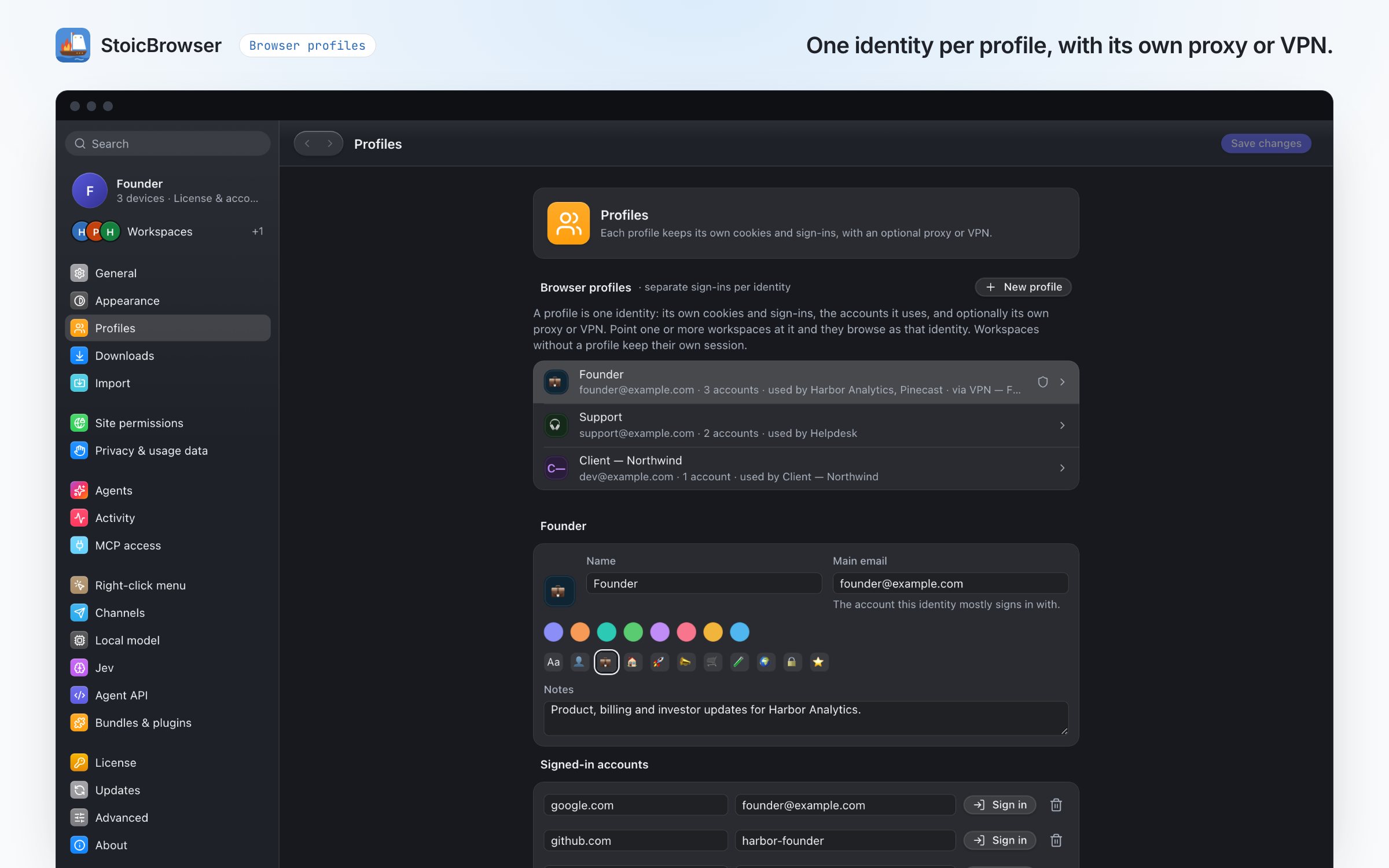
In Stoic Browser a browser profile is one identity, and Settings → Profiles can send that profile's traffic through its own proxy. Only the workspaces that use the profile go through it; the rest of the app and the rest of your computer don't.
Turn on "Send this profile's traffic through a proxy", pick SOCKS5 or HTTP and enter the host and port, such as an endpoint your VPN provider gives you.
A workspace picks its profile from its right-click menu, under Browser profile, and its open tabs reload signed in as that profile.
Proxies that ask for a user name and password work too: paste the line your provider gives you to fill in the fields, and Test connection shows the IP address and country sites will see.
In a profile with a proxy, WebRTC stays behind the proxy, so sites can't read your real IP address through it.
It works on both macOS and Windows.
Where: Settings → Profiles
Browser profiles and their proxies are on Free and Pro; Free includes 2 workspaces.
Settings → Profiles in Stoic Browser 1.8.0, the real components with sample data.
No. A VPN app usually routes the whole computer through an encrypted tunnel. A proxy set in a browser carries only that browser's traffic. Many VPN providers offer proxy endpoints, so one profile can get a location without moving everything else.
Is my traffic encrypted through a SOCKS5 proxy?
A SOCKS5 proxy doesn't add encryption of its own. Pages served over HTTPS stay encrypted between your browser and the site either way.
Can I use a proxy that needs a password in Stoic Browser?
Yes, since version 1.4. Enter the user name and password next to the host and port, or paste your provider's line. The password is kept in the system keychain, not in the profile.
Free for 2 workspaces. No account needed. macOS and Windows.