AnswersHow to

Answers

How do I stay signed in to two accounts on the same site at once?

Updated 23 Nov 2026

The short answer

A site keeps you signed in with cookies, and a browser profile holds one set of cookies per site. To stay signed in to two accounts, give each its own set: a second browser profile, a Firefox container, or a private window. Some sites, Google among them, also switch between accounts themselves.

Your options

  1. A second browser profile

    Chrome, Edge and most other browsers let you add profiles. Each has its own cookies, history and extensions, in its own window.

    Best when You want the accounts fully apart and don't mind one window per account.

  2. Firefox Multi-Account Containers

    Mozilla's add-on gives tabs a colored container with its own cookies, so two accounts can sit in tabs of the same window.

    Best when You use Firefox and want both accounts in one window.

  3. A private window

    A private or incognito window starts with no cookies, so you can sign in to a second account there. It forgets everything when you close it.

    Best when You need the second account once, for a few minutes.

  4. The site's own account switcher

    Google, Microsoft and some other sites let you add accounts and switch between them without signing out.

    Best when The site offers it: look for an Add account option in its profile menu.

With a Chrome profile

  1. Add a profile. In Chrome, click your profile picture at the top right and choose to add a new profile. You can use it without signing in to Chrome.
  2. Name it and give it a color. Name the profile after the account and pick a color, so each window shows which account it belongs to.
  3. Sign in there. Open the site in the new profile's window and sign in with the second account. The first profile stays signed in to the first account.
  4. Open each account from its own shortcut. On Windows, Chrome can also put a desktop shortcut on your desktop that opens straight into that profile.

The same job in Stoic Browser

Stoic Browser gives each product a workspace with its own browser session, so the same site can be signed in to a different account in each workspace, in one window.

  • Each workspace keeps its own tabs, layout and sign-ins, and switching between them signs nothing out.
  • Since 1.3, a browser profile holds one identity, like Founder or Support, and any number of workspaces can use it.
  • Saved passwords fill in for the exact site, and the right-click menu lists the site's other saved logins under Fill Saved Login.
  • Agents and MCP clients act in the workspace you name, so a reply goes out from the account you meant.
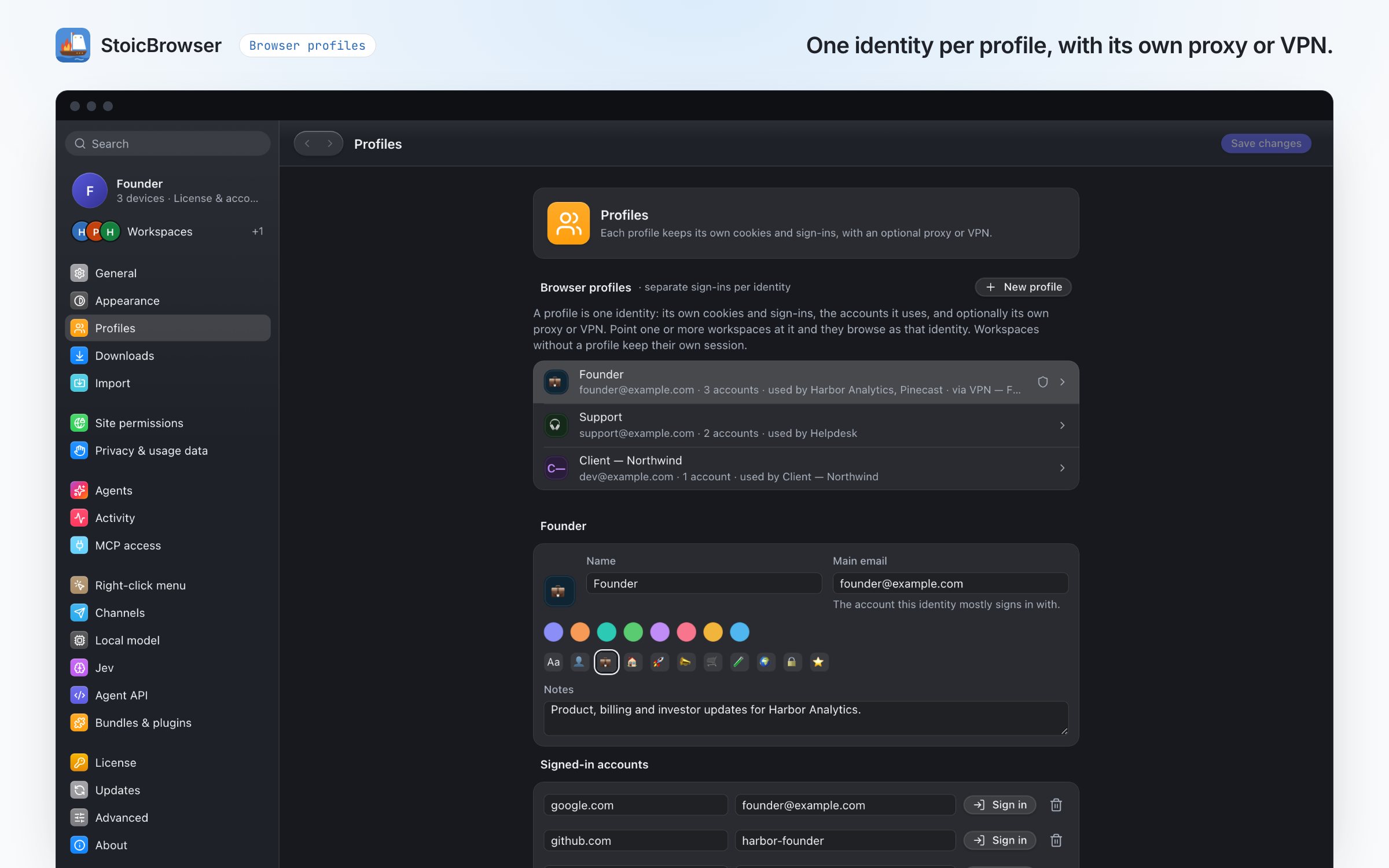
Where: Settings → Workspaces and Settings → Profiles

Free includes 2 workspaces; Pro, from $29 once, removes the cap.

Settings → Profiles with three browser profiles, the Founder profile open with its name, main email, colour, icon and notes, and its signed-in accounts for google.com, github.com and stripe.com
Settings → Profiles in Stoic Browser 1.8.0, the real components with sample data.

Questions

Something missing? Write to hello@stoicsoft.com.

Does a private window keep me signed in?

No. A private window keeps one set of cookies for as long as it is open and deletes them when you close it, so you sign in again every time.

Are Chrome profiles separate enough for client accounts?

For cookies, history and saved passwords, yes: each profile keeps its own. They still share your computer, network and IP address, so a site can see the same connection.

How many accounts can I keep apart in Stoic Browser?

One per workspace. Free includes 2 workspaces and Pro has no limit. With browser profiles, several workspaces can also share one identity.

Free for 2 workspaces. No account needed. macOS and Windows.

Download Stoic Browser