Blog· 7 min read
Hand browser chores to Jev, and keep your tabs beside the page
Stoic Browser 0.6.0 adds Jev, a TypeSafe decision model that checks prices and runs QA passes in your signed-in pages and answers with lines quoted from them, plus side tabs and a full tab menu.
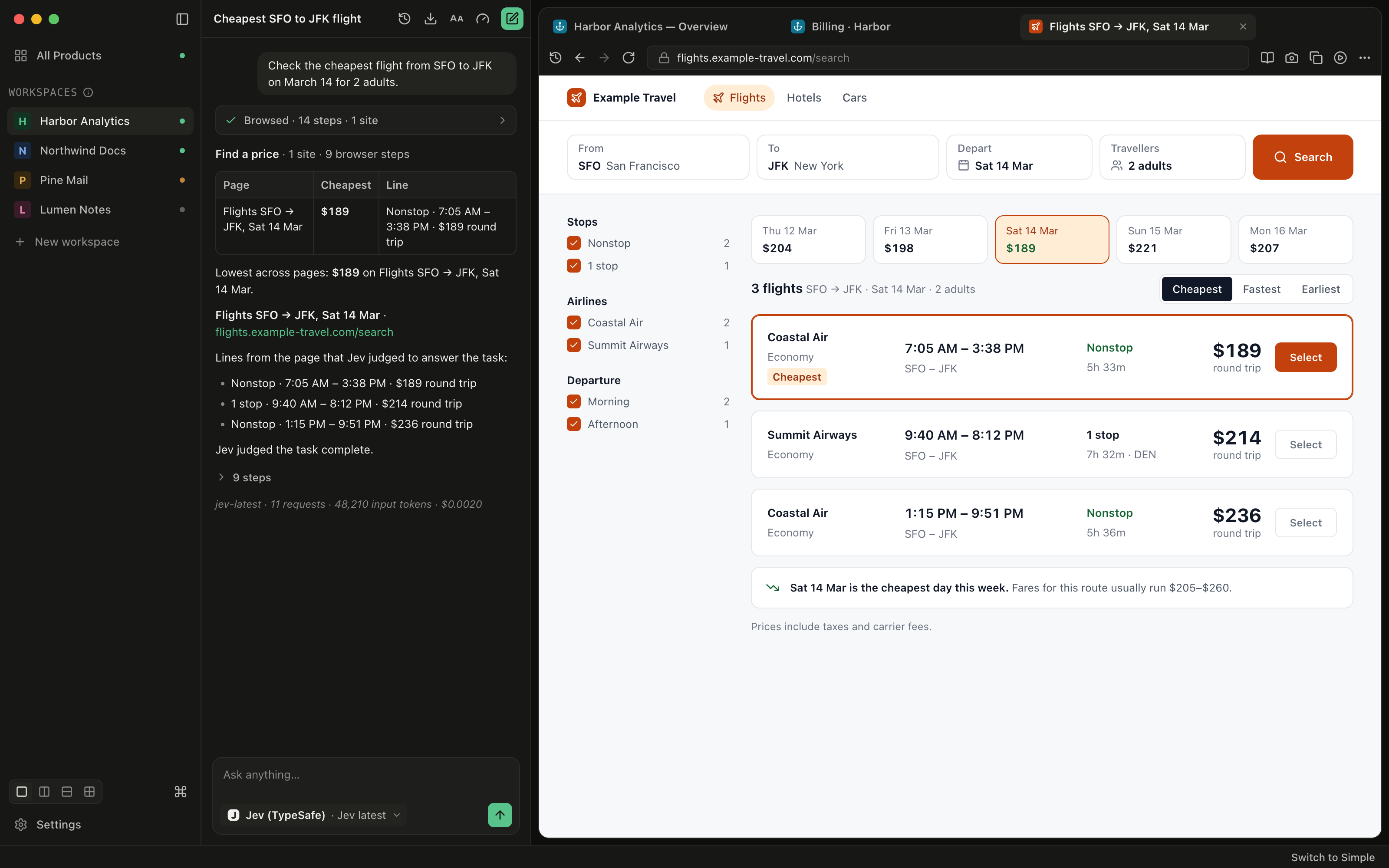
You need one number from the web: the cheapest flight on a date, the price of a product on two shops, whether the sign-up form on staging still works. You could ask Claude Code or Codex to do it in the browser, and they will. But a coding agent is a writer. It spends a long turn reading pages, then hands back a paragraph you have to trust, and the run comes out of the same subscription or token budget you use for real code. For a price check, that is a lot of model for very little answer.
Or you do it by hand. Open the site, type the airports, pick the date, scroll past the ads, copy the price into your notes. It takes five minutes, and you do it again next week.
What changed
Stoic Browser 0.6.0 adds Jev, the decision model from TypeSafe, as an agent in chat. Now you can describe a browser task in a sentence and get back the lines from the page that answer it, without a coding agent writing an essay about it.
Jev is a different kind of model from the coding CLIs. It does not write text. At every step, the browser lists what can be done on the page (each link, field and button, plus scroll, back and wait), and Jev picks one, with a probability attached. Stoic Browser carries the action out, checks the page again and repeats until Jev judges the task done. The reply is assembled from the page itself.
How it works in practice
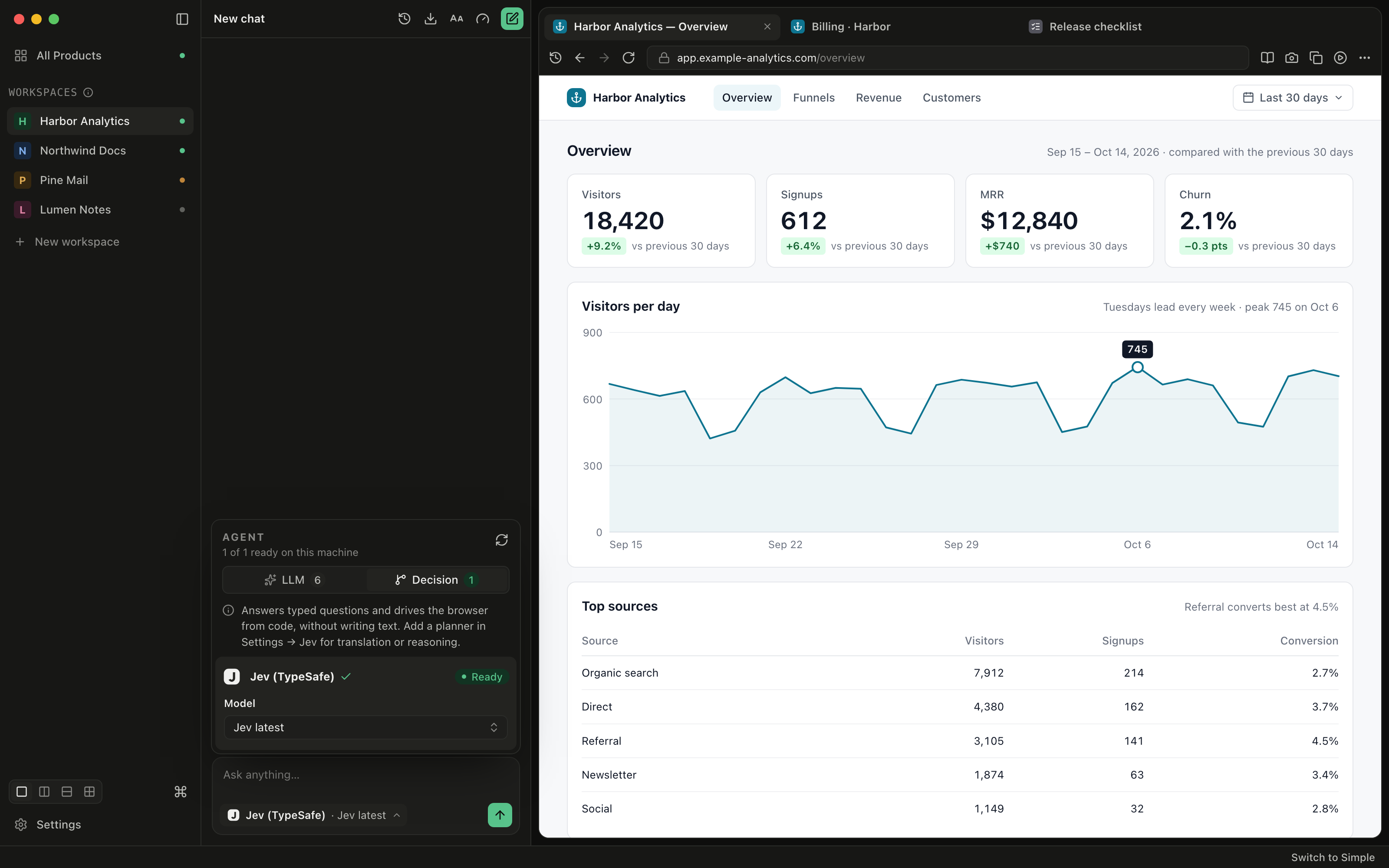
Pick Jev from the Decision tab
The agent picker now has two tabs. LLM holds the coding CLIs and local models you already use. Decision holds Jev. Each tab says how many agents are ready on this machine, so you can tell at a glance whether a key is missing.
Choose Jev (TypeSafe) under Decision, then type the task the way you would say it: "Check the cheapest flight from SFO to JFK on March 14 for 2 adults", "Compare the price of the Kindle Paperwhite on amazon.com and bestbuy.com", or "QA the sign-up flow on staging and report anything broken."
Jev works in the current workspace's pages, so the logins you already have there carry over. Tool scopes and Sandbox limits apply to it like any other agent. When a page asks for a login, a password or a verification code, Jev stops and hands the page to you if the login handoff tool is on, instead of guessing.
Read a reply you can check
When the run ends, the reply quotes only lines from the pages Jev visited. For a price task, the cheapest results come first, in a table of page, price and line. Below that is a collapsible list of every step Jev took, and the cost of the run.
When the final page does not show what you asked for, the reply says so instead of claiming an answer. That is the point of a model that cannot write: there is no paragraph for it to fill in, so nothing in the answer comes from anywhere but the page.
If the run stops short, type "continue" or "try again". Jev picks up the last task on the page it left open, rather than starting over at a search engine.
Set it up once in Settings → Jev
Jev runs on your own TypeSafe API key, which you get from console.typesafe.ai/keys. Paste it into Settings → Jev. Stoic Browser encrypts it with your system keychain, sends it only to api.typesafe.ai, and makes one small request to confirm that it works. The run in the screenshot above read 48,210 input tokens and cost $0.0020 at TypeSafe's published price.
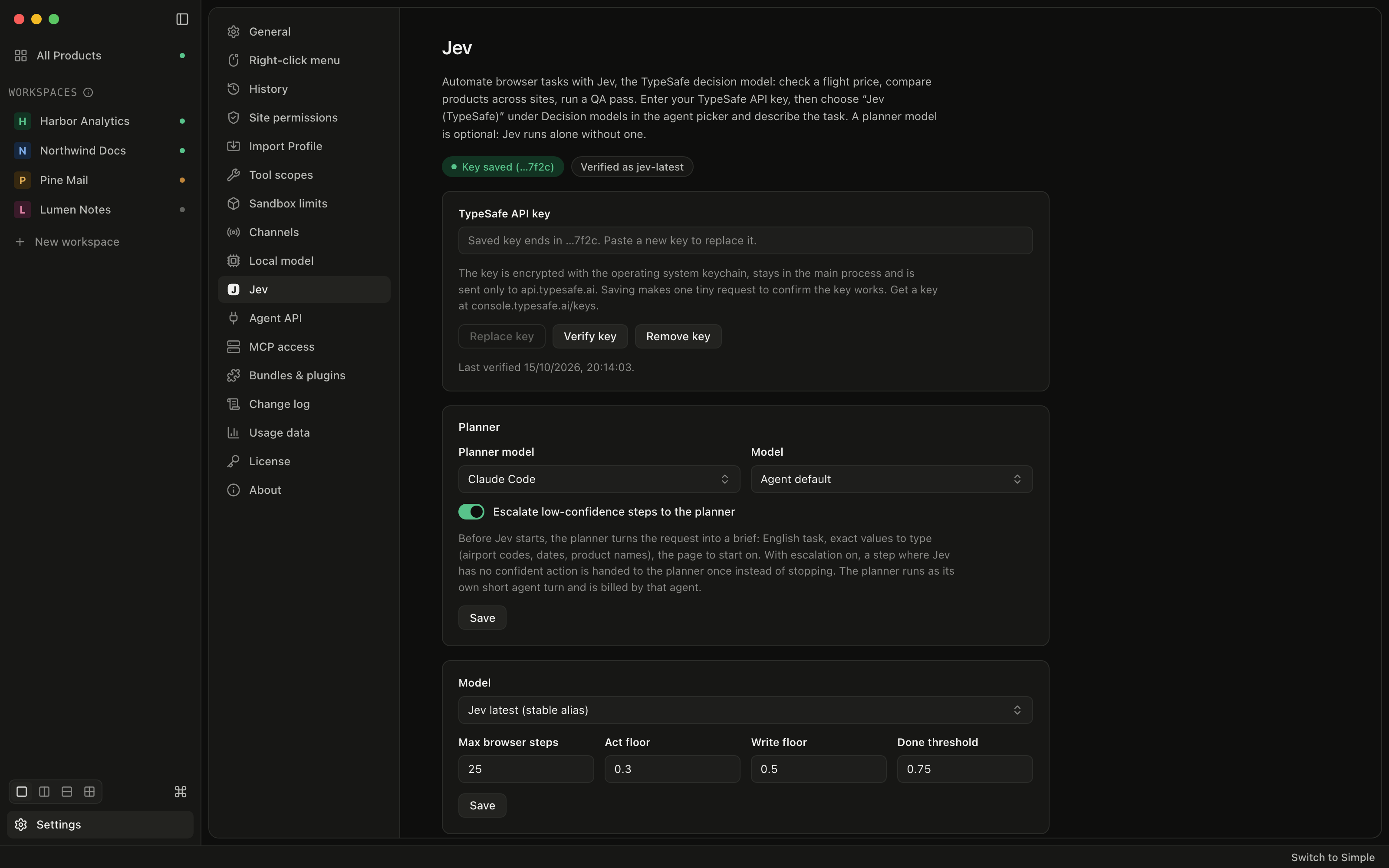
The same page sets how far Jev may go:
- Max browser steps caps the actions in one run (25 by default).
- Act floor is how sure Jev must be before a read-only action, like clicking a link or scrolling (0.3 by default).
- Write floor is the higher bar for typing, choosing from a list or pressing a button such as Buy, Submit or Delete (0.5 by default).
- Done threshold is how sure Jev must be that the page answers the task before it stops (0.75 by default).
Add a planner when the task needs words
Jev can only type values that appear in your request. Without help, it will never put something you did not write into a form. That is safe, but it means "a flight to Tokyo next Friday" leaves it without an airport code or a date.
The optional Planner in Settings → Jev fixes that. Pick one of your coding CLIs (or your local model). Before Jev starts, the planner turns your request into exact values (airport codes, dates, product names) and a page to start on. With Escalate low-confidence steps to the planner on, a step where Jev has no confident action goes to the planner instead of ending the run. The planner's turns are billed by that agent, not by TypeSafe.
Use Jev outside chat
Once a key is saved, Jev also works in automation agent steps, from Telegram and through the Agent API. A scheduled price check can run on Jev while your coding agents stay free for code.
Tabs beside the page, and more room for it
The same release changes how the window is laid out.
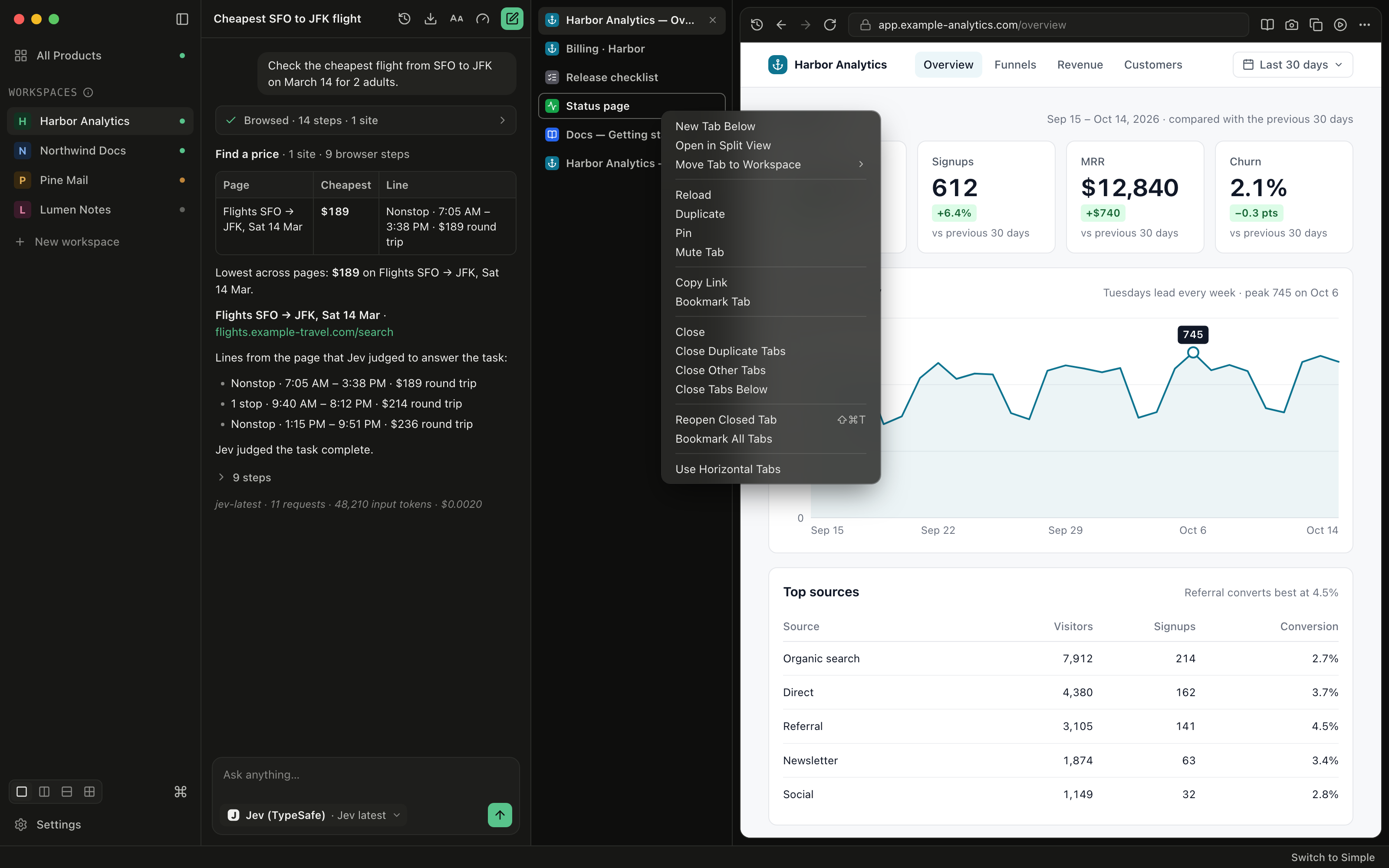
Tabs can sit in a column beside the page. Choose Top or Side under Tabs in Settings → General (Settings → Appearance in the Simple interface), or pick Use Vertical Tabs from a tab's right-click menu. Drag the column's edge to make it wider or narrower. Page titles get a full line each, so a long list of tabs stays readable.
Right-clicking a tab now opens a full menu. From it you can open a new tab next to it, open it in split view, move it to another workspace, reload, duplicate, pin, mute, copy its link or bookmark it. It can also close duplicate tabs, the other tabs or the tabs below, reopen a closed tab and bookmark all tabs. Pinned tabs stay open when several tabs close at once, and Cmd/Ctrl+Shift+T reopens the last closed tab where it was.
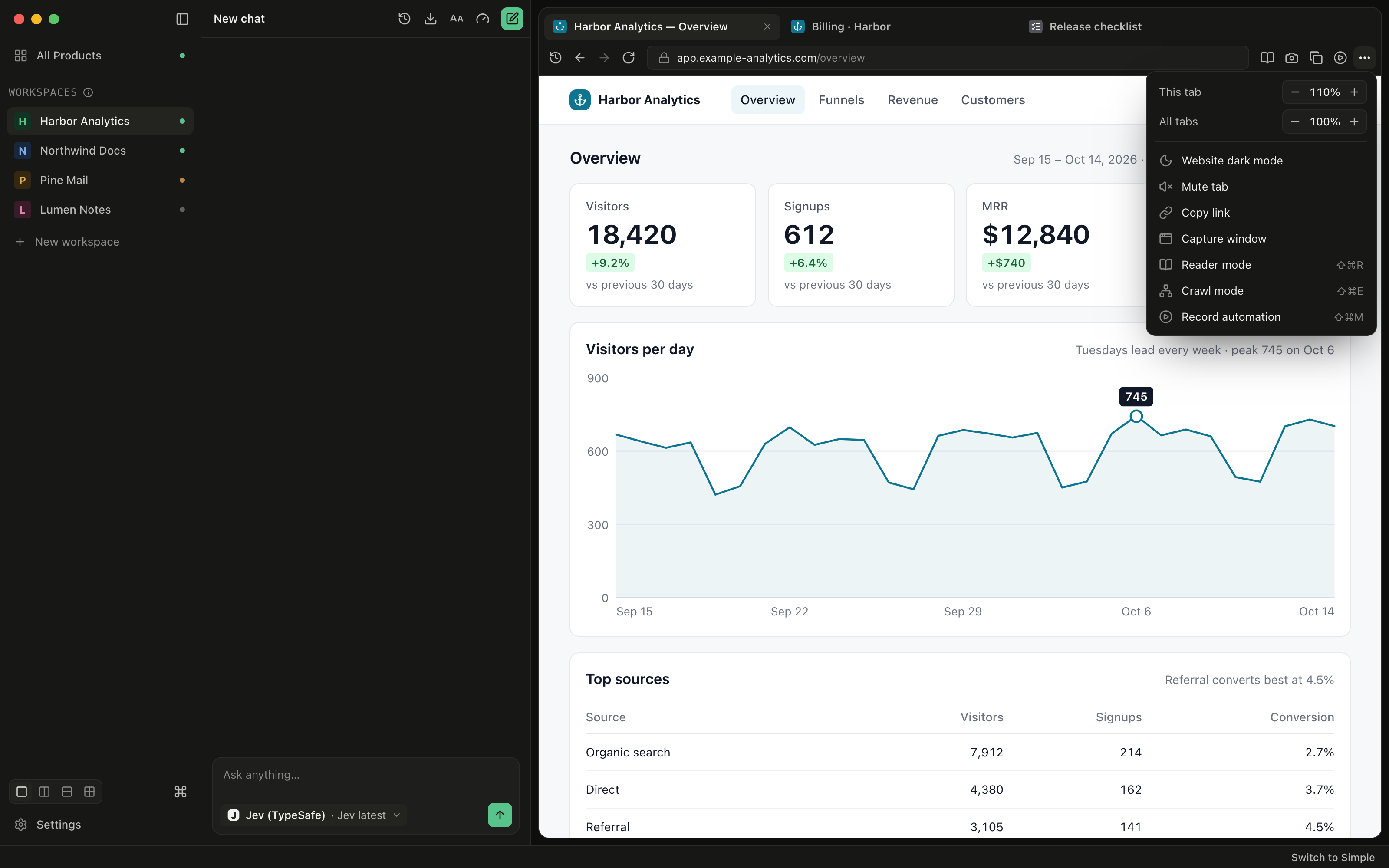
The Full interface drops its top toolbar, so pages get that height back. Each pane's bar now holds Record automation and a ⋯ Page tools menu. That menu has zoom for this tab and for all tabs, website dark mode, mute, copy link, capture, Reader, Crawl mode and record. The layout switcher and the command palette moved to the sidebar footer, and on macOS the window buttons sit in the sidebar header.
Two smaller changes land in chat too. Export chat offers Copy to clipboard next to Save export… for JSON and Markdown, and replies now render collapsible sections and underscore italics.
Before vs After
| Task | Before 0.6.0 | With 0.6.0 |
|---|---|---|
| Check a price on a site you are signed in to | Do it by hand, or spend a coding agent's turn and read its summary | Ask Jev; get the quoted lines and the cheapest result first |
| Know where an answer came from | Trust the agent's paragraph | The answer is quoted from a page Jev visited |
| When the page lacks the answer | The agent may still write one | The reply says the page does not show it |
| Keep a cheap model from typing into forms | Rely on the agent's judgement | A separate, higher confidence bar for any typing or risky button |
| Many tabs open | One row across the top | Top or a side column you can resize |
| Close everything but this tab | One at a time | Close Other Tabs, with pinned tabs kept |
Who benefits most
Founders who watch prices and competitors. A weekly check on a supplier's price or a rival's pricing page is a short Jev task, and it can run in an automation without using your coding agent's budget.
Anyone who tests their own sign-up flow. A QA task walks the form in your signed-in workspace and reports what it found, quoting the page rather than describing it.
People who keep twenty tabs open per product. The side column and the new tab menu make those workspaces manageable without an extension.
Try it
Update to Stoic Browser 0.6.0 from the download page or the in-app updater. Paste a TypeSafe key in Settings → Jev, pick Jev under Decision, and give it the price you were about to look up by hand. You get the answer with the lines that prove it, and your coding agents stay free for the work that needs them.