Blog· 5 min read
Stoic Browser 1.0: signed in to Google, at a fraction of the size
Stoic Browser 1.0 runs on the browser engine your system already ships, so Gmail, Analytics and Search Console sign in inside your workspaces, the installer is 11 MB on Windows, and your setup carries over.
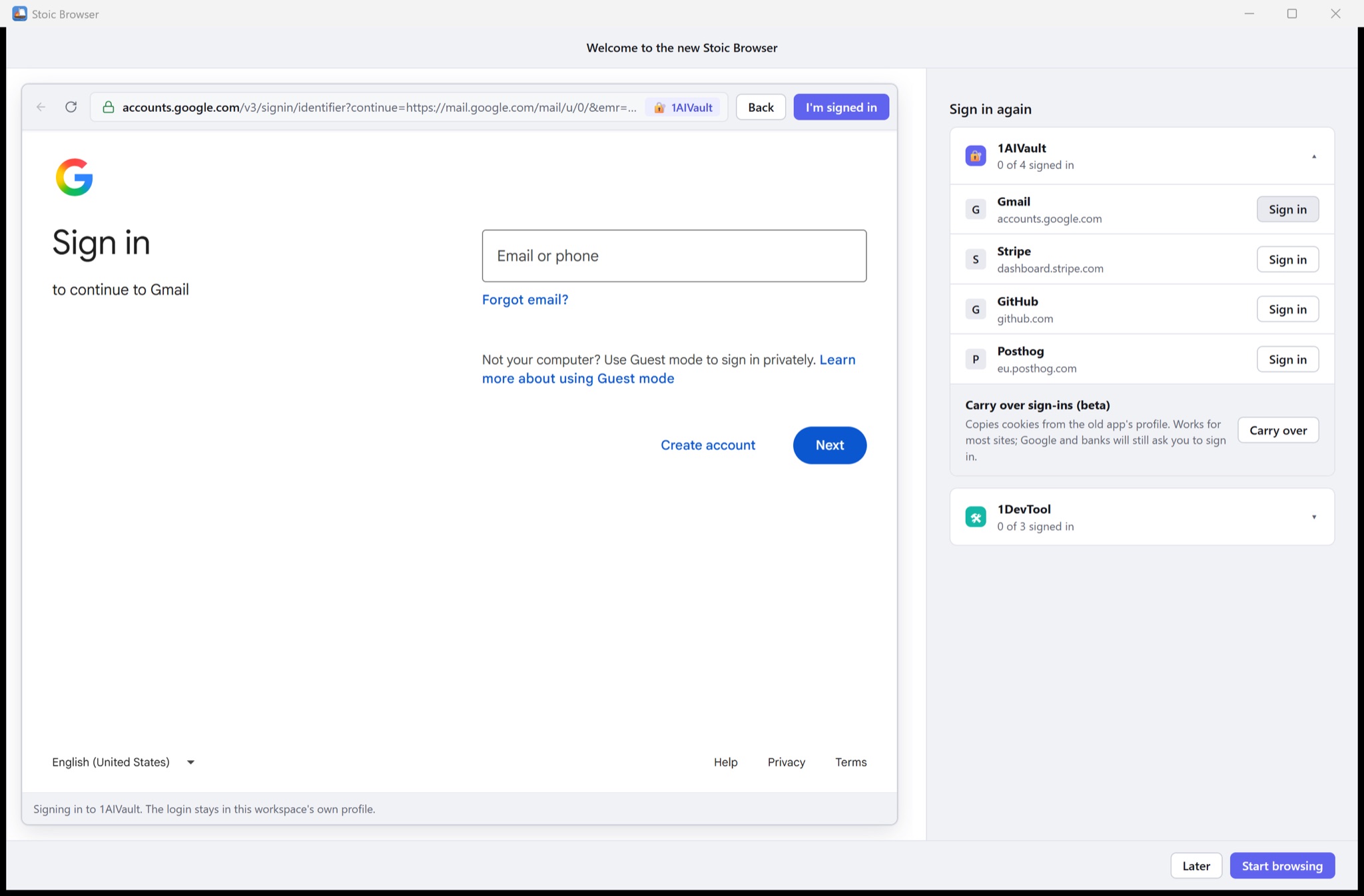
You open your Analytics workspace to check yesterday's traffic, click Sign in with Google, and the page stops: "This browser or app may not be secure." Gmail does the same. So do Search Console, Calendar and every "Sign in with Google" button on the tools you pay for. The accounts a founder needs most were exactly the ones Stoic Browser could not open, so you kept a second browser around for them, and your command center was missing the very numbers it was built to watch.
The other cost was quieter. The installer weighed 122 MB on Windows and around 140 MB on a Mac, because it carried a full copy of Chromium alongside the one your system already runs.
What changed
Stoic Browser 1.0 is rebuilt on the browser engine your operating system already ships: WebKit on macOS and Microsoft Edge WebView2 on Windows. Now you can sign in to Google inside any workspace, and the download is 11 MB on Windows and 28 MB on macOS, without losing a single workspace, automation or chat.
How it works in practice
Your setup comes with you
You do not export anything or start over. The first time 1.0 opens, it finds the profile the previous version left on your computer, backs up the database once, and opens it in place. Your workspaces, tabs and layouts are there, along with bookmarks, history, automations and their past runs, metrics, chats, prompts, memories, knowledge indexes, MCP connections and settings.
If the old app is still running, 1.0 asks you to quit it first, so the two never write to the same files at once.
Sign in once per workspace, from one list
Website sign-ins are the one thing that cannot move, because the engine underneath is new. Instead of leaving you to discover that site by site, the first launch opens a "Welcome to the new Stoic Browser" window with a Sign in again list. It groups the sites you pin in each workspace, shows how many are signed in, and opens each sign-in page right there.
Each workspace keeps its own logins, exactly as before. Signing in to Gmail in your 1AIVault workspace does not sign you in anywhere else, and the footer of the sign-in pane tells you which workspace you are using. Passkeys and two-factor prompts work as usual.
If you would rather not sign in to everything again, Carry over sign-ins (beta) copies the cookies from the old app's profile into a workspace. It works for most sites. Google and banks will still ask you to sign in, since they tie their sessions to the device and the browser.
Google stops turning you away
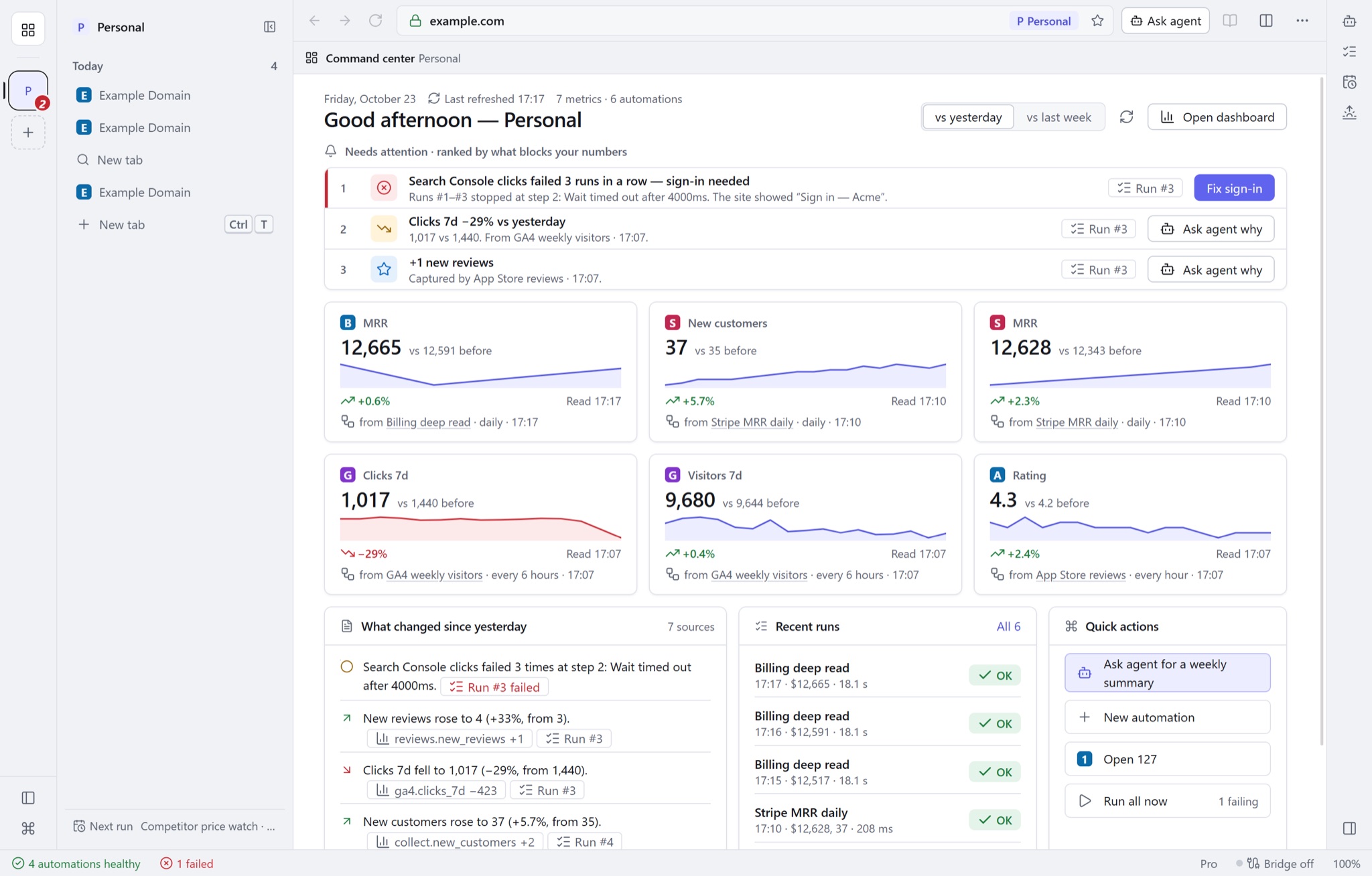
This is the change you will notice first. Gmail, Calendar, Analytics and Search Console now load in your workspaces like any other site. Automations that read your Search Console clicks or Analytics visitors can sign in and keep running, and the command center can finally show the numbers you set it up to watch.
Automations at the time you choose
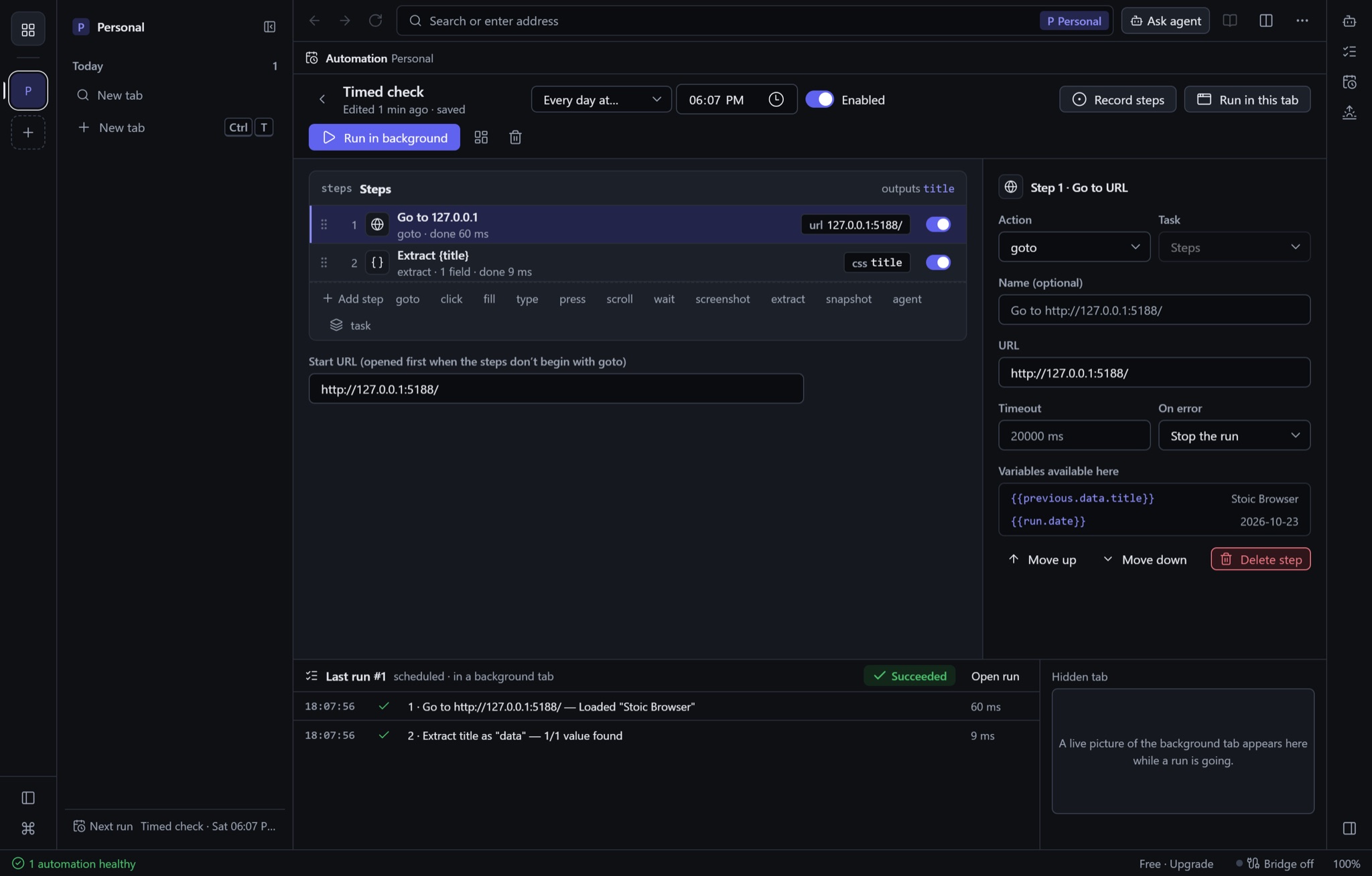
Automations used to run on an interval. You can now pin one to a time of day: Every day at… a time you pick, or only on weekdays. The run happens in a background tab, and the run log shows each step with how long it took, so a morning revenue check is waiting for you when you sit down rather than whenever the last interval happened to land.
Downloads you can follow
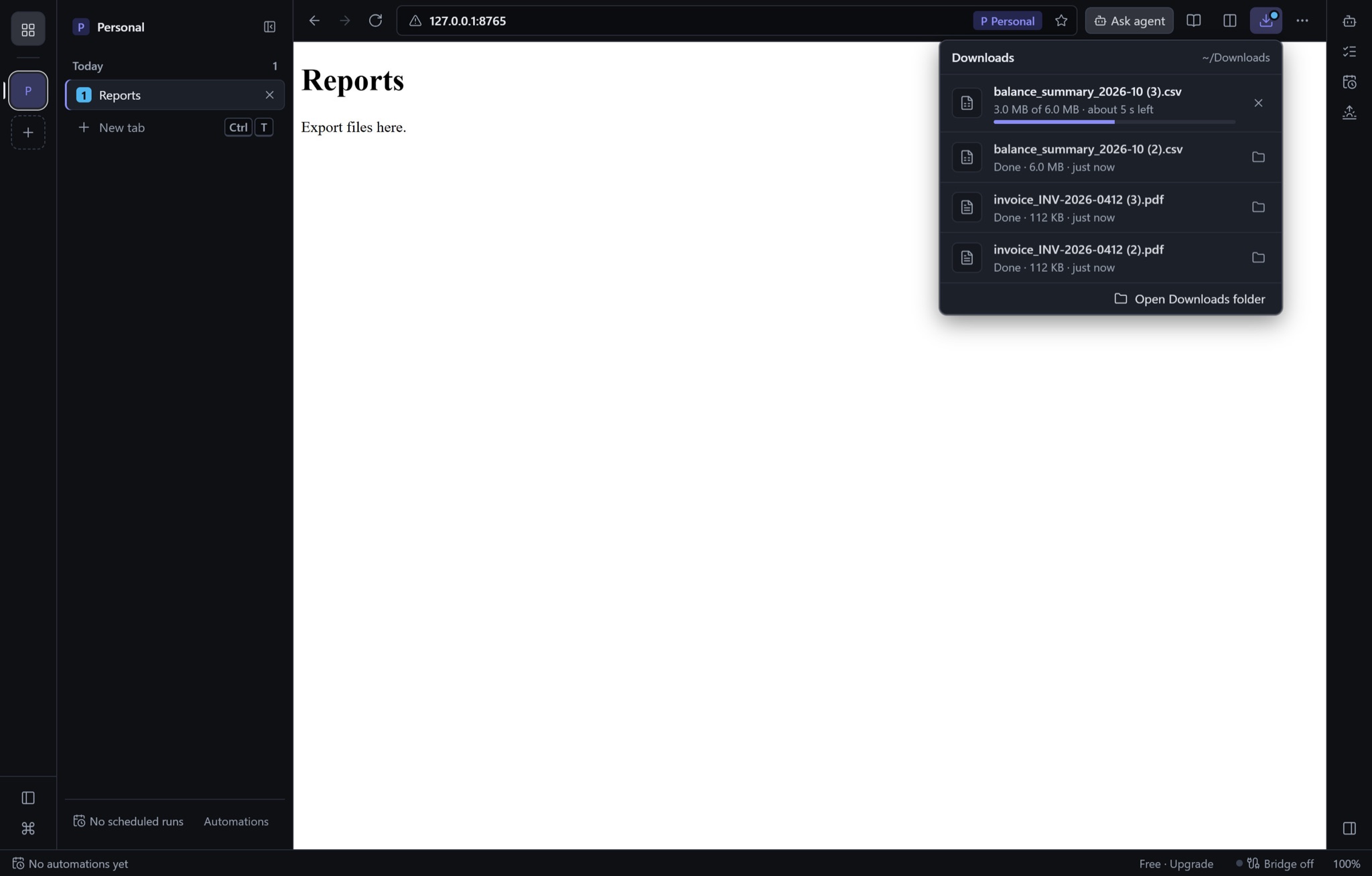
Files you download now appear in a Downloads list with a progress bar and the time left, and you can open the folder from the same list. A page that fails to load shows a clear page explaining why, instead of a blank pane.
Your agents keep working
If you connected Claude Code, Codex, Cursor or Claude Desktop to Stoic Browser over MCP, you do not have to change their configuration. The same settings reach the new app. Your per-workspace tool scopes and sandbox limits still apply to every call.
Two things also got safer without you doing anything. Saved passwords and tokens now live in the macOS Keychain or the Windows Credential Manager. And the web pages you open get no access to the app at all: only Stoic Browser's own interface can talk to it. That matters in a browser whose pages are handed to AI agents.
Before vs After
| Before (0.7) | Stoic Browser 1.0 | |
|---|---|---|
| Signing in to Gmail, Analytics or Search Console | Blocked with "This browser or app may not be secure"; open another browser | Signs in inside the workspace |
| Windows installer | 122 MB | 11 MB |
| macOS installer | 137 MB or 144 MB, one per chip | 28 MB, one build for Apple silicon and Intel |
| Moving to a new version of the engine | — | Your workspaces, automations, chats and settings open in place; sign in to sites once from a list |
| Scheduled automations | Every 15 minutes, hour, 6 hours or day, counted from the last run | Also at a set time every day, or Monday to Friday |
| Saved passwords | Encrypted inside the app's database | Keychain or Credential Manager |
Who benefits most
Founders who live in Google tools. If your traffic, search and email sit behind a Google account, your workspaces can now hold all of them, and the automations that read them stop failing at the sign-in page.
Anyone on a small laptop drive. A Windows install a tenth of the old size, and an engine shared with the system, leave more room for the work itself.
People who drive the browser with agents. Your MCP clients keep working with the same configuration, and pages can no longer reach the app that those agents are using.
Try it
Download Stoic Browser 1.0 from stoicbrowser.com/download. On a Mac it needs macOS 14 Sonoma or later; on Windows, WebView2 is installed for you if it is missing. The Windows build is not code-signed yet, so SmartScreen may warn the first time: choose More info, then Run anyway. If you use an earlier version, quit it and install 1.0: your profile is picked up on first launch. Linux is not in 1.0 yet, so Linux users can stay on 0.7.2 for now. Sign in to each site once, and your command center has its Google numbers back.