AnswersHow to

Answers

How do I get an alert when my MRR or revenue drops?

Updated 23 Nov 2026

The short answer

Read revenue from your payment provider's API on a schedule and compare each reading with the last one. A subscription analytics tool, a webhook for cancellations and failed payments, or a small script can do it. Set the alert as a level, such as MRR below $5,000, or as a drop of more than a percentage.

Your options

  1. Webhooks for the events behind a drop

    Stripe and Lemon Squeezy send webhooks for cancellations and failed payments, so you hear about churn as it happens rather than after it adds up.

    Best when Best as an early warning, alongside a check on the total.

  2. A subscription analytics tool

    Analytics services connect to your payment provider, chart MRR and churn, and can email you about changes.

    Best when Best when you also want cohorts, churn and forecasts, not only an alert.

  3. A scheduled script

    A short script reads active subscriptions from the API, adds up MRR, stores it and messages you when it falls.

    Best when Best when you want one exact number and are happy to run code.

  4. A revenue connector with alert rules

    Some tools read MRR with a read-only key on a schedule and let you set an alert on the number like on any other metric.

    Best when Best when you want revenue next to your other product numbers, with no code.

Build it yourself

  1. Create a read-only key. In Stripe, create a restricted key with read access to the resources you need, such as Subscriptions. Lemon Squeezy keys are created in Settings → API. Keep the key out of shared code.
  2. Add up MRR. List active subscriptions and convert each price to a monthly amount. This gives MRR before discounts and tax, in the price's currency.
    import Stripe from "stripe";
    
    const stripe = new Stripe(process.env.STRIPE_KEY);
    const perMonth = { day: 30, week: 52 / 12, month: 1, year: 1 / 12 };
    let mrr = 0;
    for await (const sub of stripe.subscriptions.list({ status: "active", limit: 100 })) {
      for (const item of sub.items.data) {
        const { unit_amount, recurring } = item.price;
        mrr += (unit_amount * (item.quantity ?? 1) * perMonth[recurring.interval]) / recurring.interval_count / 100;
      }
    }
    console.log(mrr.toFixed(2));
  3. Compare and alert. Save each reading with its time. When the new value is below your level, or more than a set percentage under the last one, send yourself an email or a chat message.
  4. Run it on a schedule. Run the script every few hours with cron on a Mac or Linux server, or with Task Scheduler on Windows. Daily is enough for most businesses.
  5. Add webhooks for churn. Subscribe to events such as customer.subscription.deleted and invoice.payment_failed in Stripe, or subscription_cancelled and subscription_payment_failed in Lemon Squeezy, to hear about the cause as it happens.

The same job in Stoic Browser

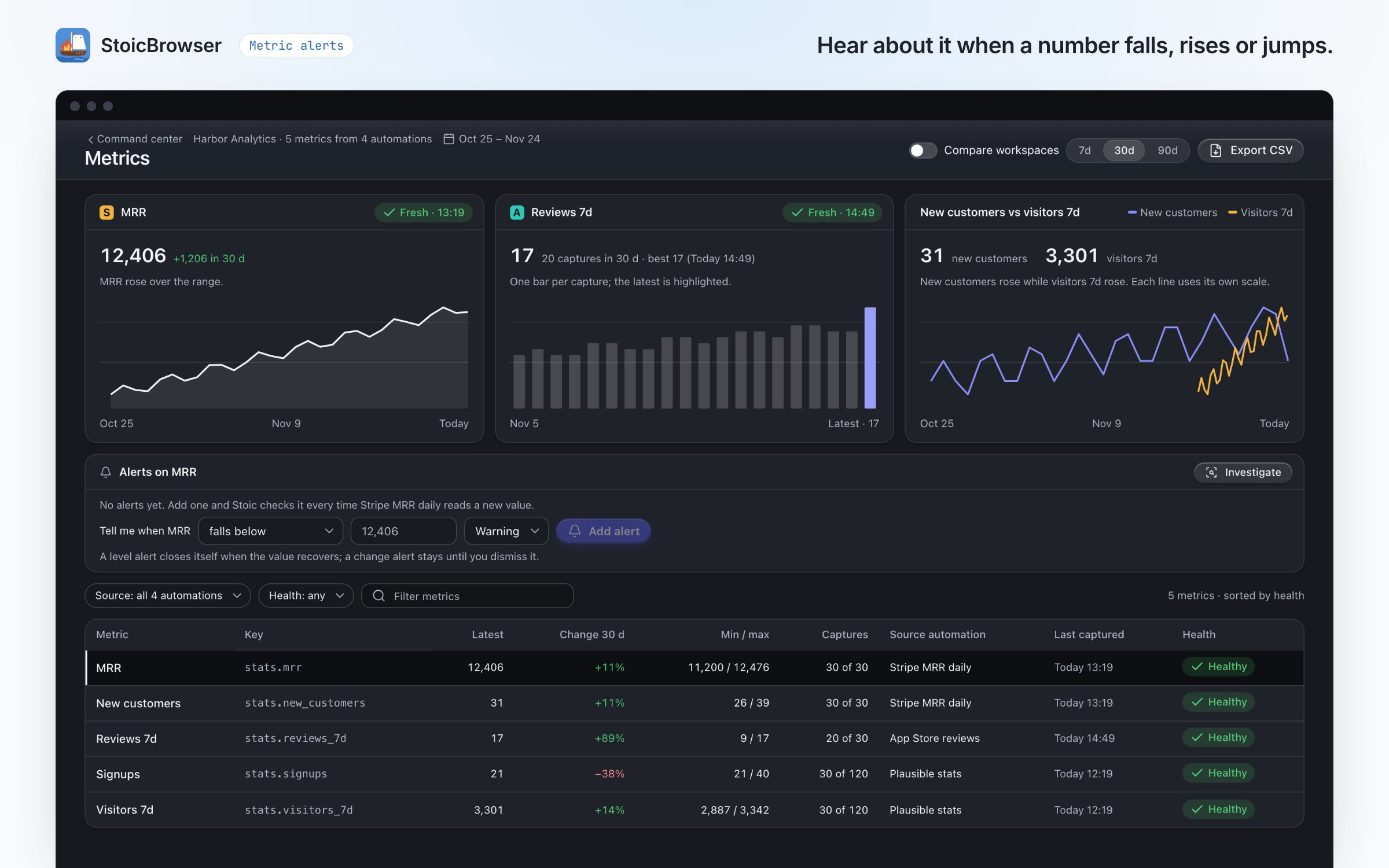
Stoic Browser reads revenue straight from Stripe or Lemon Squeezy with a read-only key, on a schedule, and puts the numbers on the workspace dashboard. Add an alert to the MRR metric and it is checked on every reading.

  • Stripe gives MRR, active subscriptions, and revenue and new customers in the last 24 hours. Lemon Squeezy gives 30-day and total revenue and sales, and active subscriptions.
  • The key is a Stripe restricted key or a Lemon Squeezy API key, kept in the macOS Keychain or Windows Credential Manager. Nothing in your account is ever changed.
  • Readings every hour, every 6 hours or every day at 8:00. Alerts can fire when MRR falls below a value or drops by more than a percentage.
  • An alert appears in Needs attention and as a system notification, and Investigate starts a read-only agent chat with the readings to find the likely cause.
Where: Command center → Quick actions → Connect Stripe or Lemon Squeezy

A connector counts as a monitored source: Free includes 1, and Pro has no cap, from $29 once.

The metrics page with MRR over 30 days, reviews per capture and new customers against visitors, an alert form for MRR and a table of five metrics with their source automation and health
The metrics page in Stoic Browser 1.8.0, the real components with sample data.

Questions

Something missing? Write to hello@stoicsoft.com.

Should I alert on a level or on a percentage drop?

Use a level for the line you never want to cross, such as MRR below last quarter's. Use a percentage drop between readings to catch sudden churn. Many founders set one of each.

Why does my MRR differ between tools?

Tools count discounts, trials, taxes, yearly plans and paused subscriptions differently. Pick one definition and alert on that number, not on a mix.

Is a read-only key safe to give a tool?

Safer than a full key, because it cannot refund, cancel or change anything. Give it only the read access the tool asks for, and revoke it in your provider's settings when you stop using the tool.

Does Stoic Browser need to be open for the readings?

Yes. Connectors read on a schedule from your computer, so the app must be running, with a window or in headless mode. A reading that was due while it was closed runs at the next start.

Free for 2 workspaces. No account needed. macOS and Windows.

Download Stoic Browser