Free
Included.
FeaturesInvestigate
Chores and numbers · New in 1.2.0
Every item in Needs attention, every changed line, every metric and every failed run has an Investigate button. It starts an agent chat that already holds the evidence. The agent reads your sites and code without changing anything, and brings back the likely cause.
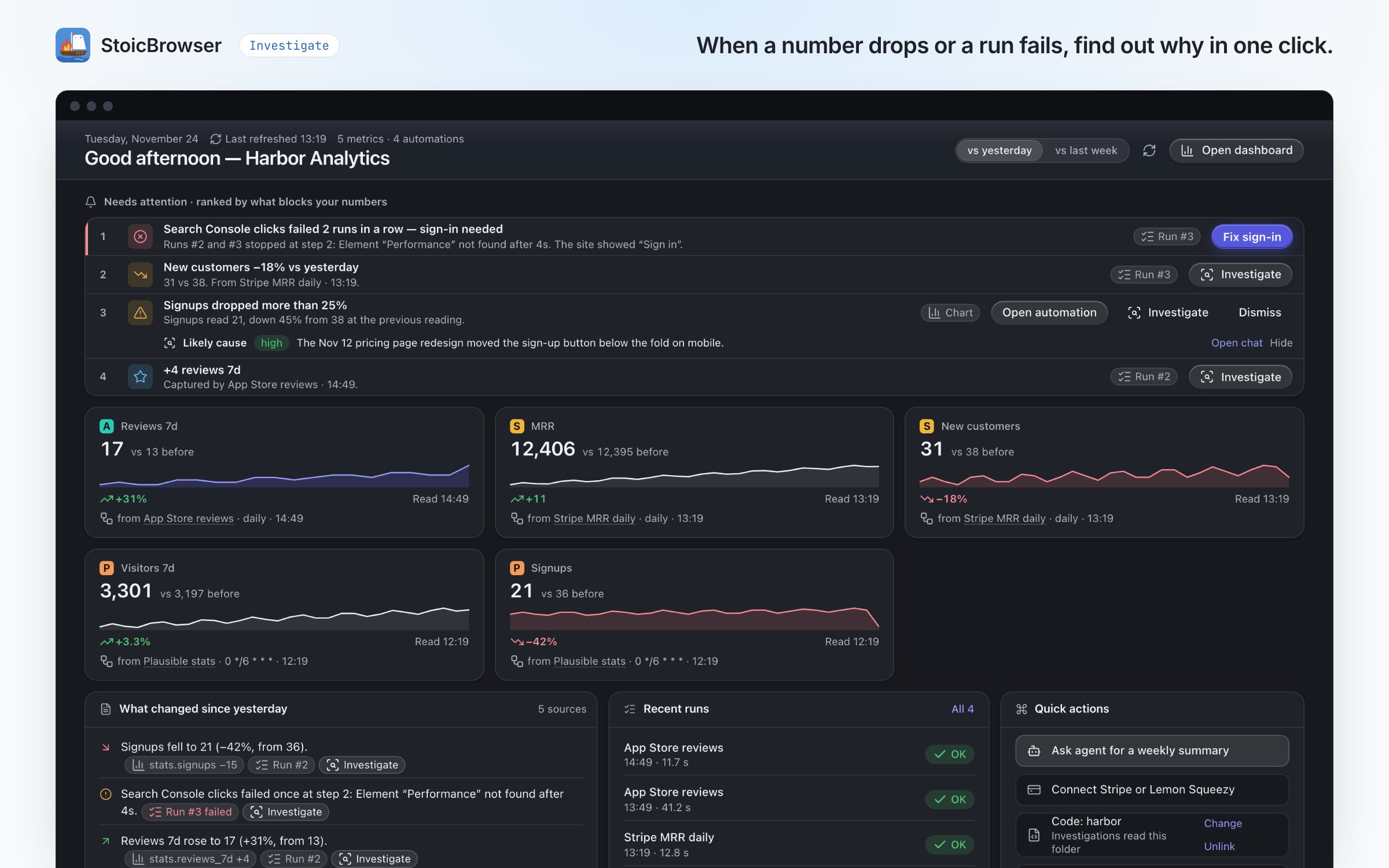
The chat starts with the recent readings and the change, the run that read them, and for a failed run the step that broke, its page and its log.
The agent runs as the Investigator persona, in a read-only sandbox. It can open and read pages but cannot click, type or submit.
Link a product's code folder in Quick actions and investigations read it and its recent git history.
The agent ends with the likely cause, how sure it is, the evidence it saw and next steps.
The same line appears under the item in the command center, with Open chat.
Included.
Included.
Works on macOS 14 or later.
Works on Windows 10 and 11.
Something missing? Write to hello@stoicsoft.com.
No. Investigations run as a read-only persona: the agent can open and read your sites, but cannot click, type or submit anything.
The coding agent you use in the chat, such as Claude Code or Codex, under its own account.
Only if you link the product's code folder. Then it reads the code and recent git history to see what shipped around the change.
Free for 2 workspaces. No account needed. macOS and Windows.
Download Stoic Browser