AnswersHow to

Answers

How do I monitor a web page for changes, like a competitor's pricing?

Updated 23 Nov 2026

The short answer

Point a page-monitoring tool at the page, pick the part that matters, such as the price, and set how often to check and where to send alerts. For a page behind a login, or a number you want charted over time, extract that value on a schedule and alert when it moves.

Your options

  1. A page-change service

    Cloud services and browser extensions check a page on a timer, compare it with the last version and email you the difference.

    Best when Best for public pages, when any change to a region of the page is worth knowing about.

  2. The site's own feed or newsletter

    Many products publish a changelog, an RSS feed or a pricing newsletter that announces changes before you would spot them.

    Best when Best when the site offers one; it is the most reliable signal and costs nothing.

  3. A small scheduled script

    A script fetches the page, reads one value and writes it to a log or sends a message when it differs from the last run.

    Best when Best when you are comfortable with code and want full control over what counts as a change.

  4. A scheduled extraction with alerts

    Extract the one number you care about on a schedule, keep its history and alert when it crosses a level or moves by a percentage.

    Best when Best when you care about a value rather than any change, or the page needs your login.

Set up a check by hand

  1. Decide what a change is. Write down the exact value or section you care about, such as the monthly price of the Pro plan. Watching the whole page alerts you about banners and dates too.
  2. Find a stable target. Right-click the value and choose Inspect. Note a selector or the visible label next to it, which survives redesigns better than a long generated class name.
  3. Pick a sensible interval. Pricing pages change rarely. Checking once a day is usually enough and keeps you polite to the site.
  4. Send alerts where you look. Route alerts to the place you already check, such as email or a chat channel, and include the old and new value so you can act without opening the page.

The same job in Stoic Browser

In Stoic Browser you record a short automation that opens the page and extracts the value, and put it on a schedule. Each run's numbers become a metric with a history, and an alert rule on that metric tells you when it moves.

  • Extract mode in the recorder: click the price on the page and it becomes a field of an Extract data step, named after its label.
  • Alerts on the dashboard: falls below or rises above a value, or drops or rises by more than a percentage between readings.
  • An alert lands in Needs attention and as a system notification. Investigate hands the readings to a read-only agent that looks for the cause.
  • Crawl Mode saves a table, list, metric or text from any page on a schedule, for when you want the rows rather than one number.
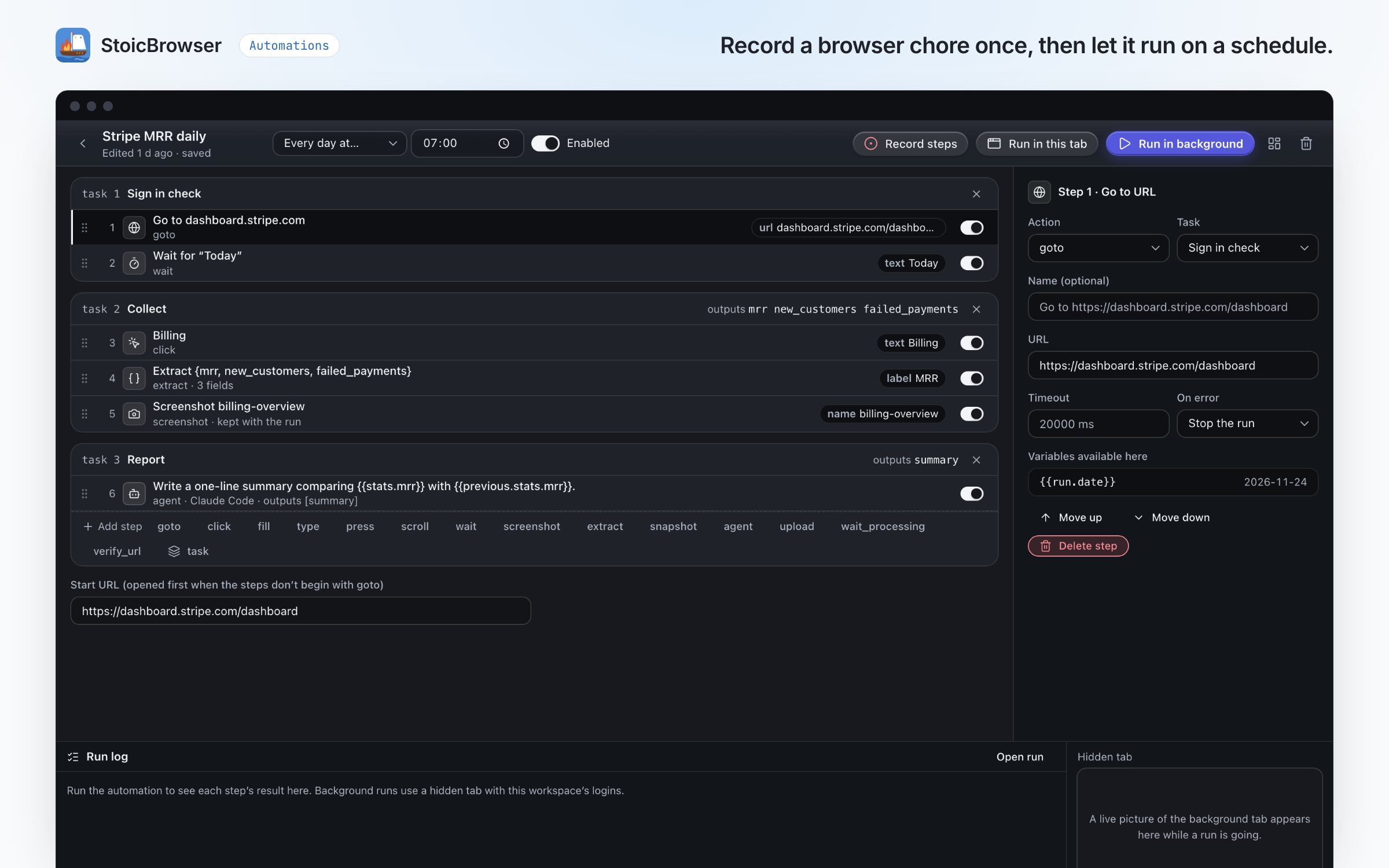
Where: Automations → Record steps, then Extract mode

Free includes 1 saved automation and 1 monitored source; Pro has no cap, from $29 once.

An automation called Stripe MRR daily set to run every day at 07:00, with three tasks of steps, the step types you can add, and the editor for its first step
An automation in Stoic Browser 1.8.0, the real components with sample data.

Questions

Something missing? Write to hello@stoicsoft.com.

How often should I check a competitor's page?

Once a day is enough for pricing and feature pages. Checking every few minutes adds load to their site and rarely tells you anything sooner that matters.

Is it fine to monitor a competitor's public page?

Reading a public page is what any visitor does, but check the site's terms, keep the interval modest and do not try to get around blocks or logins that are not yours.

Why watch one value instead of the whole page?

Whole-page monitoring alerts you about rotating banners, dates and cookie notices. Watching one value, like a price, only alerts when that value changes, and gives you a history you can chart.

Free for 2 workspaces. No account needed. macOS and Windows.

Download Stoic Browser